-
Written By Rohan Wiese
-
Updated on March 12th, 2026
How to Resolve SQL Server Error 5 Access Denied
 4.9 based on 1809 user reviews
SQL Server Error 5 Access Denied is a common issue that occurs when SQL Server does not have permission to access a file/folder. In the year 2026, users seem to be looking for the best solution to resolve the error. This blog covers the common causes and their fixes to help users. Using this guide helps you understand the permission issue and its solution. Along with that, if you have corrupt or damaged files, you can use the Data Recovery Freeware SQL Recovery Tool.
What is SQL Server Error 5 Access Denied?
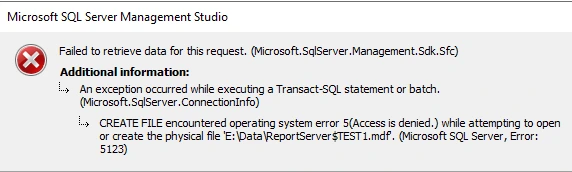
Essentially, SQL error 5 occurs when a file system permission error occurs. This indicates that the SQL server account lacks the necessary Windows permissions. Moreover, users can see SQL attach database error 5 access denied when attaching a database or restoring a database.
Remember: The error usually appears with a message like Operating System Error Code 5: Access is Denied, as shown in the image.
Common Causes of the SQL Server Backup “Access Denied” Error
Some common factors in that error arose:
- Incomplete file paths are used during operations.
- The error arises when you are attaching the LDF and MDF files.
- Further, the targeted files or folders are marked as read-only.
- Moreover, the files are located on a network share that the service account cannot access.
- Above all, the main cause is the file ownership issue.
Top Methods to Fix SQL Server Operating System Error Code 5 Access is Denied
- Grant Permission to SQL
- Check SQL Server Service Account
- Move Database to Safe Location
- Temporarily Disable Antivirus
- Run SQL as Administrator
- Professional SQL Recovery Software
Method 01: Grant Full Permission to SQL
- First, locate the database file or backup file folder.
- Then, double-click on the folder and select the Properties option.
- After that, go to the Security tab and then click Edit and add the SQL Server service account.
- Now, allow Full Control permissions and click on Apply and OK.
Method 02: Check SQL Server Service Account
- For this, open SQL Server Configuration Manager and click SQL Server Services.
- Next, note the account name under Log On As.
- Afterward, make sure this account has permission on the database folder.
Method 03: Move Database to Save Location
To avoid restricted folders, move your files to locations like:
- C:\SQLData
- D:\DatabaseFiles
Then reattach your database.
Method 04: Temporarily Disable the Antivirus
Sometimes antivirus software blocks file access. For this, do the given pointers:
- Firstly, disable it temporarily.
- Afterward, perform the SQL operation.
- And enable it again after completion.
Method 05: Run SQL as Administrator
- Now, close SQL Server Management Studio (SSMS).
- Then, double-click SSMS and select the option Run as administrator.
- Lastly, try the operation again.
Method 06: Use Professional SQL Recovery Software
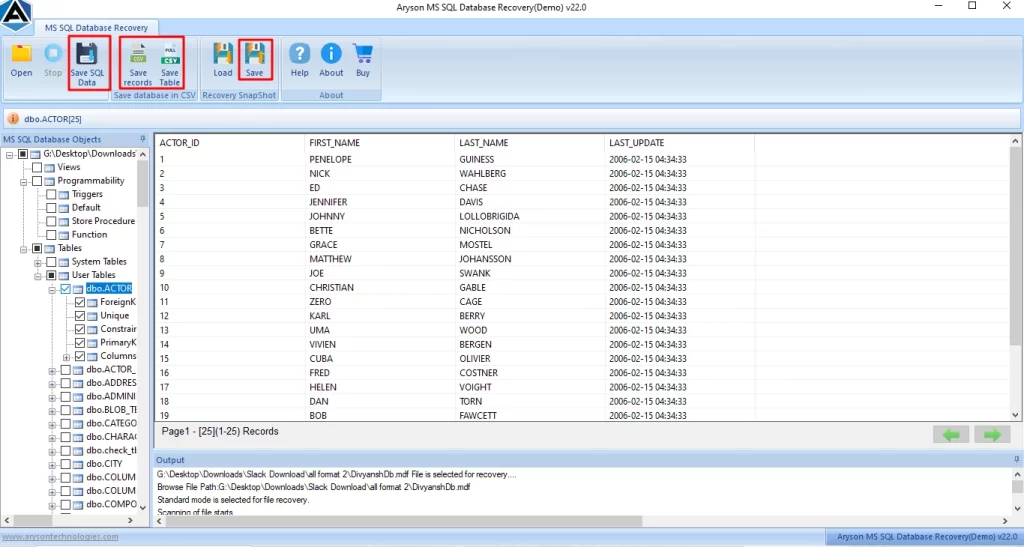
The Data Recovery Freeware SQL Recovery Software is reliable for all types of repair, including SQL Server Error 5 Access Denied. This software helps users to repair all types of major and minor errors. Its advanced scanning option helps to analyse and repair all the corrupt and damaged files. To know how this software works to resolve the Operating System Error 5 access is denied error.
Step-by-step Working Process:
- Download and install the SQL Recovery Software on your system.
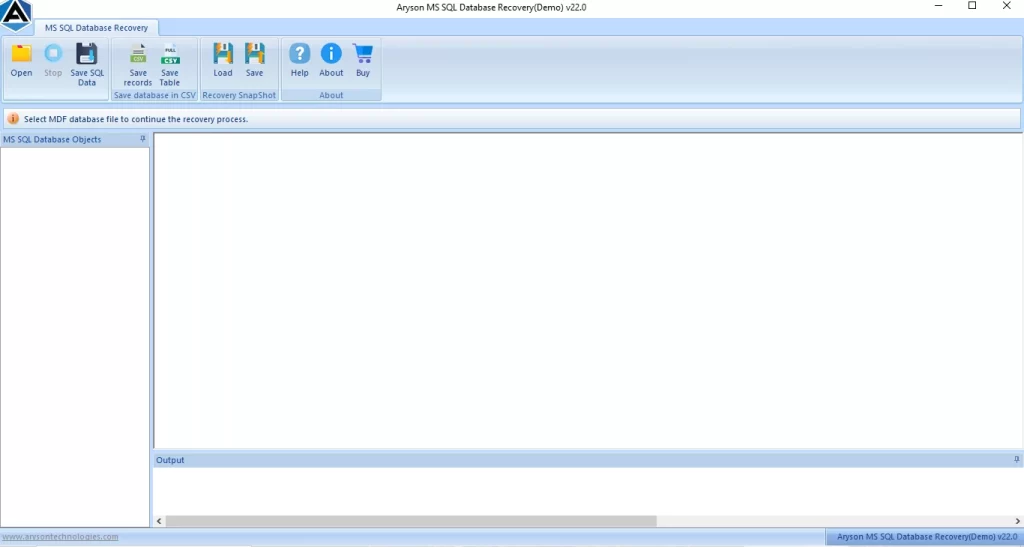
- Then, from the menu bar, tap on Open and browse the .mdf files.
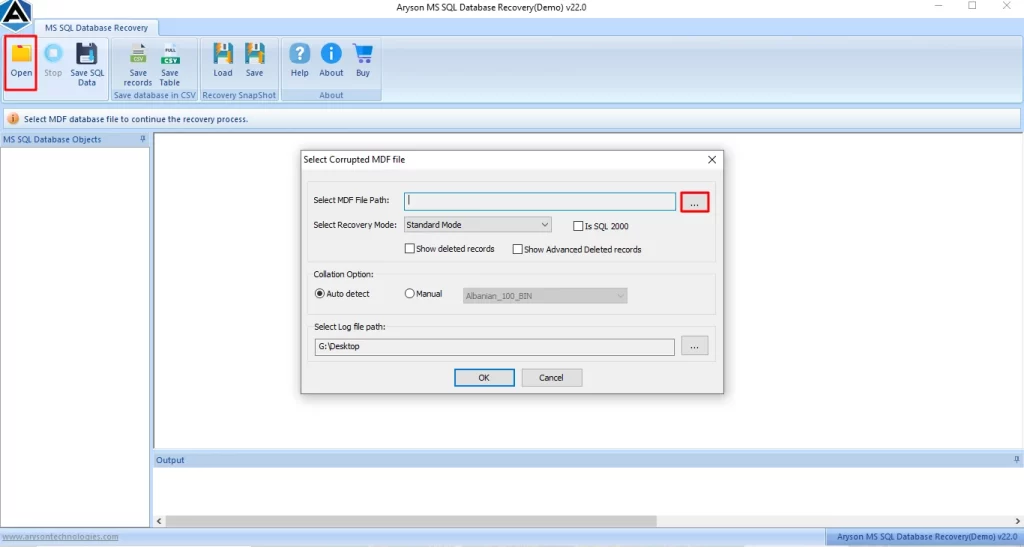
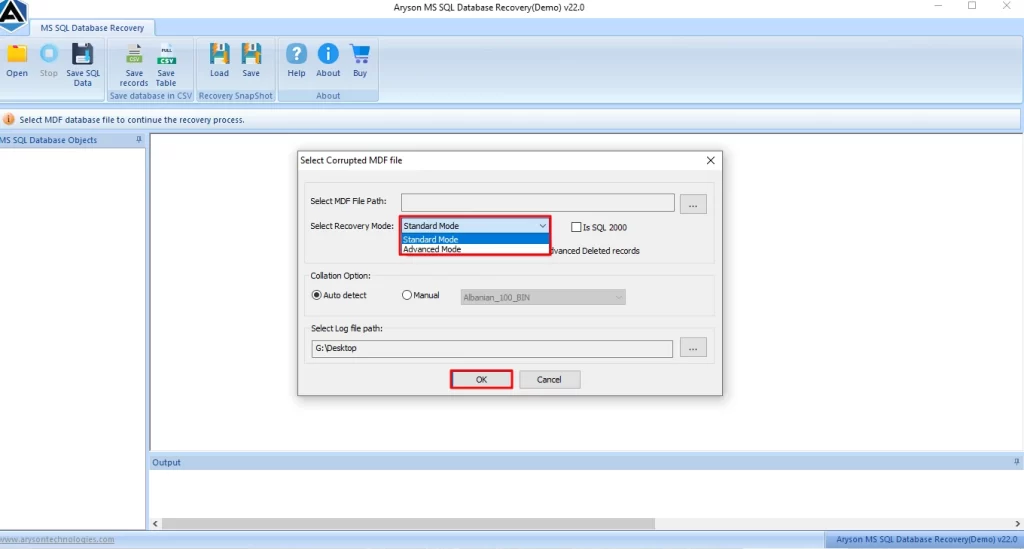
- Further, select the recovery mode, such as Standard and Advanced Mode, and click OK.
- After that, you can preview the scanned folders and view the attachments by clicking on any folder.
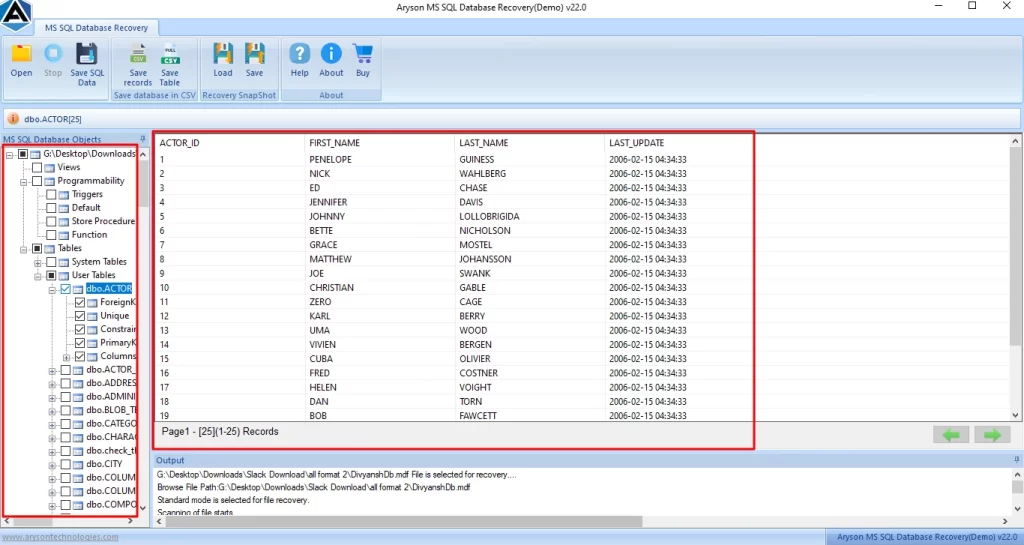
- Finally, click on Save to save your recovery files.
Note: Also, if you encounter the error 5123, then you can see our full guide on SQL Server Error 5123.
Why is this Professional Method Best for you?
- In addition, its scanning option helps users to scan their corrupt .mdf files.
- Also, it preserves the user’s data folder structure and manages the folder hierarchy.
- Further, before saving the files, the user can preview and select the folders they want to save.
- Moreover, it securely recovers tables, indexes, views, and triggers.
Conclusion
SQL Server Error 5 Access Denied occurs due to missing permissions or restricted files. Now, by granting the permission, the user can resolve the error. Therefore, by following these simple methods, you can avoid downtime and ensure smooth SQL Server operations.
Frequently Asked Questions
1. What is SQL Server Error 5 Access Denied?
Ans. It occurs when SQL Server cannot access database files due to permission issues. The DataRecovery Freeware SQL Recovery Tool helps recover data from inaccessible SQL files.
2. Why does SQL Server Operating System Error Code 5 occur?
Ans. This error occurs when Windows blocks SQL Server from accessing required files or folders. The SQL Recovery Tool allows direct access to MDF files without SQL permissions.
3. Why do I get SQL Attach Database Error 5 Access Denied?
Ans. It happens when SQL Server lacks permission to attach MDF or LDF files. The tool recovers data from unattached databases safely.
4. Does changing SQL Server service account fix Error Code 5?
Ans. Sometimes, but not always. The DataRecovery Freeware SQL Recovery Tool avoids service account changes by recovering data directly.
5. Is SQL Server Error Code 5 related to Windows permissions?
Ans. Yes, it is caused by Windows permission restrictions. The recovery tool bypasses these issues and restores SQL data easily.
4.9 based on 1809 user reviewsAbout The Author:

Rohan Wiese is a content and website optimization expert who helps blogs and businesses grow organically. He specializes in enhancing content quality, improving site structure, and increasing online visibility through smart, practical, and easy-to-implement strategies that drive long-term results.
Related Post