-
Written By Isha Singh
-
Updated on June 19th, 2026
How to Resolve Microsoft Access Database Error 2950 Efficiently
 4.9 based on 1809 user reviews
User Query: “I recently started a new job where I enter data into an existing Microsoft Access database. While working, I occasionally receive Error 2950, and no one in the office is familiar with Access enough to explain it. Since I’m new to both the job and Access, I’m not sure whether the error is caused by something I’m doing incorrectly or if there’s an issue with the database itself. What does Access Error 2950 mean, what typically causes it, and how can I troubleshoot or fix it?”
Microsoft Access is a widely used tool to manage business data. It helps users store and work with information in one place. But most of the users run into Error 2950. When this happens, forms, macros, or VBA code may stop working as expected. In most cases, the issue comes from Access security settings. Also, the program may block database content if it is not marked as trusted.
In this guide, we will explain the methods for Microsoft Access Database Error 2950, which include the DataRecoveryFreeware MS Access Database Repair Tool.
Why this Microsoft Access Error 2950?
This error appears when Access blocks a macro or VBA code from the run because the database is not in a trusted location. And it is considered untrusted by Access security settings. As a result, forms or automated tasks may fail to execute until the database is trusted or the security settings are adjusted appropriately.
How to Fix Microsoft Access Database Error 2950
Below, we will explain the most effective approaches that will accomplish the process to fix the Access Error 2950 System Resource Exceeded error.
- Enable the Database Content
- Add the Database to a Trusted Location
- Enable Macros in Access
- Check VBA References
- Repair the Access Database
- Update Microsoft Access
- Professional Software
Method 01: Enable the Database Content
Turn on the blocked content in Access to allow forms, macros, and VBA code to run properly. This is often the first step to fix restricted database behavior.
- Open the Access database.
- In case, if you see a Security Warning below the ribbon >> click on the Enable Content.
- Then, restart the database & check whether the error is resolved.
Method 02: Add the Database to a Trusted Location
Place the file in a trusted folder, so Microsoft Access treats it as safe and allows full functionality without security warnings for Microsoft Access Database Error 2950.
- Open Microsoft Access.
- Go to File >> Options >> Trust Center >> Trust Center Settings.
- Select Trusted Locations & click Add New Location.
- Browse to the folder containing your database & add it.
- Reopen the database.
Method 03: Enable Macros in Access
Activate macros from Trust Center settings, as disabled macros can stop important automation and scripts from working.
- Navigate to File >> Options >> Trust Center.
- Click Trust Center Settings >> Macro Settings.
- Choose the appropriate macro option and save the changes.
- Restart Access & test the database.
Method 4: Check VBA References
Open the VBA editor and verify that all required libraries are properly selected, since missing references can cause runtime errors.
- To initiate, press Alt + F11 to open the VBA Editor.
- Go to Tools >> References.
- Look for any references marked as Missing.
- Uncheck or replace the missing references >> save the project.
Method 5: Repair the Access Database
Use the built-in Compact and Repair tool or a recovery utility to fix the “action failed Error Number 2950” corruption and restore normal database performance.
- Open Access without opening the database.
- Select Database Tools >> Compact and Repair Database.
- Choose the affected database file and run the repair process.
Method 6: Update Microsoft Access
Keep Access updated to the latest version to fix known bugs, improve stability, and avoid compatibility issues.
- You have to first open any Office application.
- Go to File >> Account >> Update Options >> Update Now.
- Install available updates and restart your system.
Limitations of the Manual Method
|
Method 07: Professional Solution for Microsoft Access Database Error 2950
The MS Access Database Repair Tool is a solution to repair both MDB and ACCDB files, which includes issues like Error 2950. It is made to fix a wide range of minor as well as critical database errors. With its advanced scanning feature, this software carefully examines corrupted or damaged Access files & restores them efficiently. It can also resolve MS Access Database Error 3112 effectively without complications.
Step-by-Step Process to MS Access Action Failed error 2950
- Download and install the MS Access Database Repair Tool on your system.
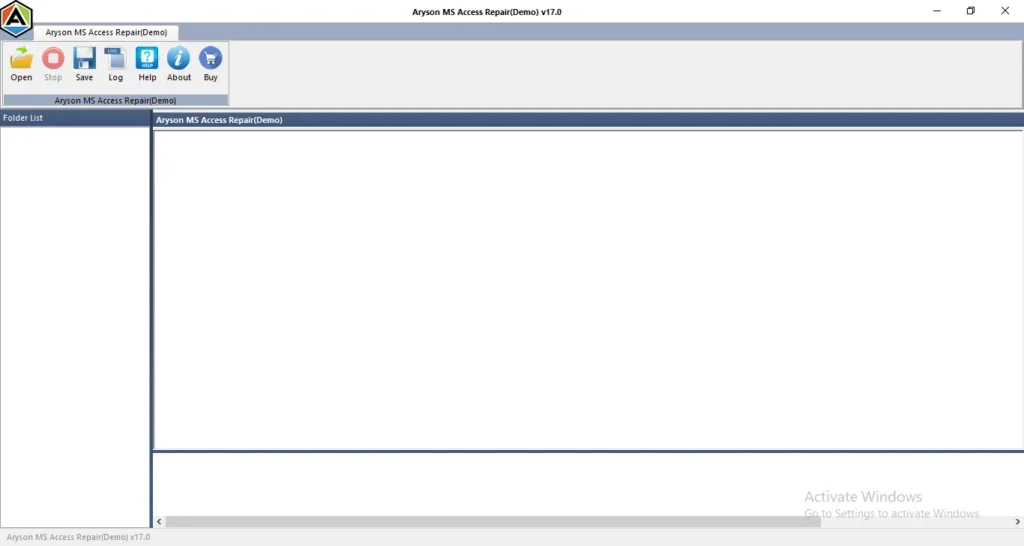
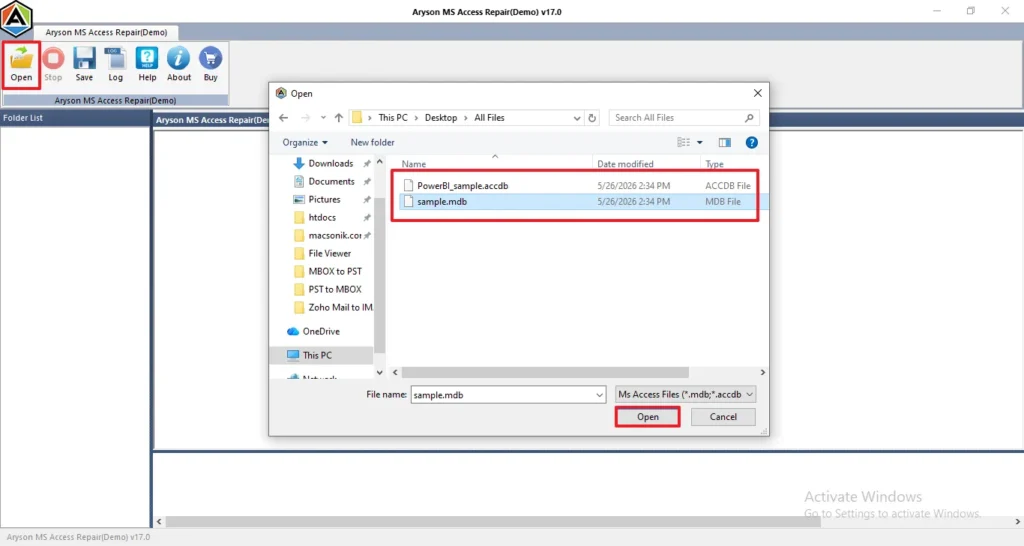
- Launch the software >> click on the “Open” option to browse and select your .mdb or .accdb file.
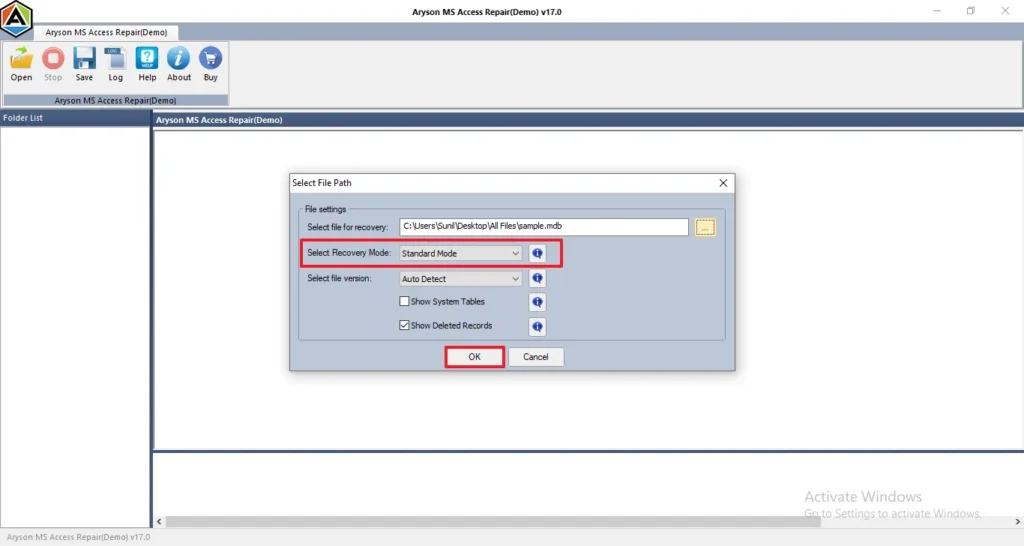
- Select a recovery mode such as Standard Mode or Advanced Mode, >> click “OK” to proceed.
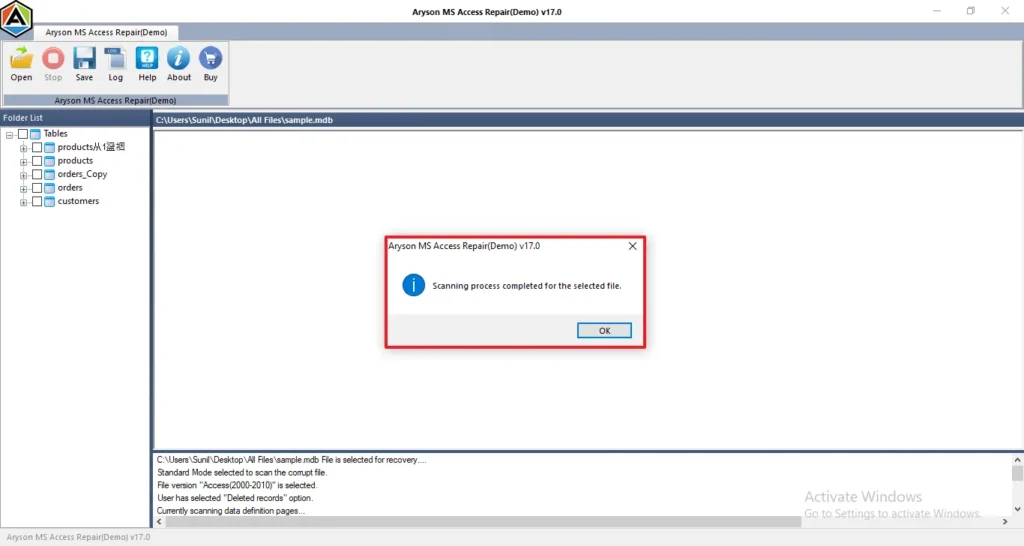
- Once the scanning is finished, a confirmation message will appear on the screen.
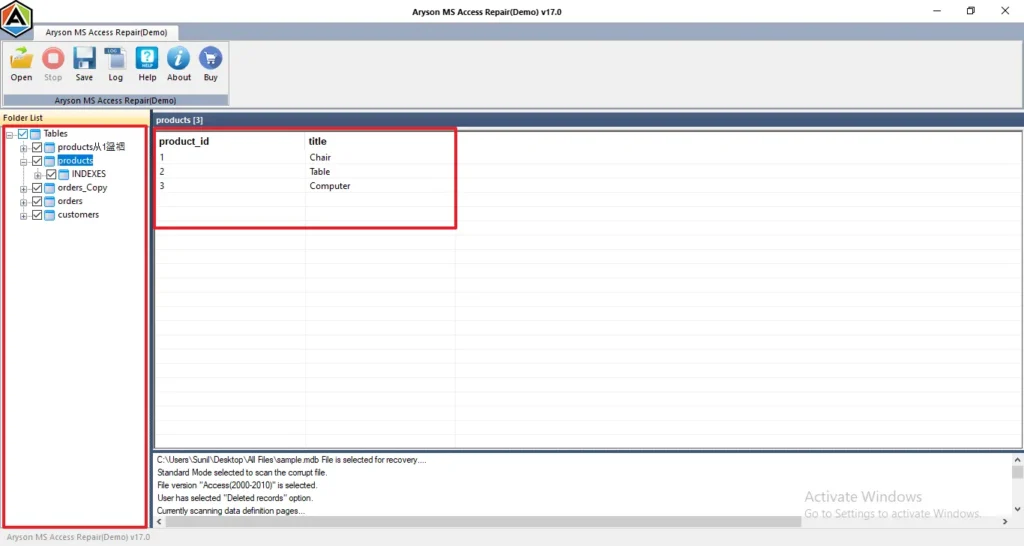
- Preview the recovered folders and check file details by opening any folder.
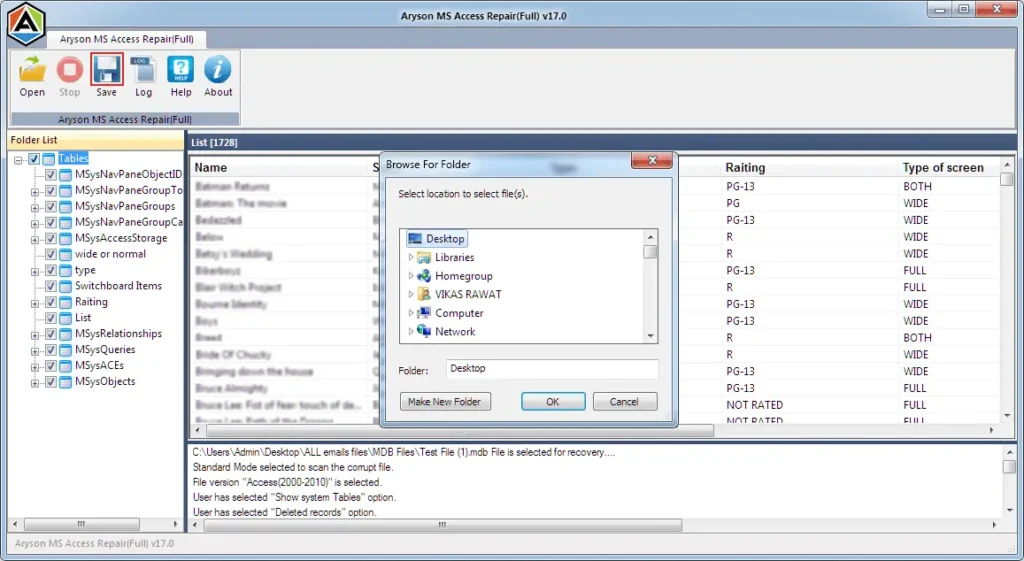
- Click on “Save” to export and store the repaired database files.
Conclusion
Microsoft Access Database Error 2950 is frustrating, and most of the time it comes down to permissions or a damaged file. First, check if the user has read access to the table. If permissions look fine, then look at the database file itself. Run the Compact and Repair tool and see if that clears things up. If the file is genuinely corrupted, there are recovery options available. Keep your network connection stable if it’s a shared database to avoid any errors.
Frequently Asked Questions
Q1. Why does Microsoft Access Database Error 2950 appear?
Ans. Microsoft Access Database Error 2950 typically appears when Access blocks a macro, VBA code, or database action due to security restrictions. It often occurs when the database is opened from an untrusted location or when the Trust Center settings prevent certain operations from running.
Q2. What causes MS Access Action Failed Error 2950?
Ans. Several factors can trigger MS Access Action Failed Error 2950, including:
- Disabled or blocked macros
- Restrictive Trust Center security settings
- Opening the database from an untrusted location
- Corrupted VBA code or macro modules
- Damaged Access database files
- Compatibility issues with different Access versions
Q3. Is Microsoft Access Error 2950 related to macros?
Ans. Yes. Error 2950 is commonly associated with macros and VBA code. When Access security settings prevent a macro or VBA procedure from executing, the application may display Error 2950. Enabling content or adding the database location as trusted often resolves the issue.
Q4. Can corrupted Access files cause Error 2950?
Ans. Yes, database corruption can contribute to Error 2950. If tables, forms, queries, macros, or VBA modules become damaged, Access may fail to execute specific actions and generate this error. Running the Compact and Repair utility or using a professional Access database repair tool can help resolve corruption-related issues.
Q5. Can outdated MS Access versions cause Error 2950?
Ans. Yes, using an outdated version of Microsoft Access can sometimes lead to Error 2950, especially when opening databases created in newer versions or when security updates are missing. Updating Access to the latest version and installing all available patches can help eliminate compatibility and security-related problems.
4.9 based on 1809 user reviewsAbout The Author:

Isha Singh is a content and website optimization expert who helps blogs and businesses grow organically. She specializes in enhancing content quality, improving site structure, and increasing online visibility through smart, practical, and easy-to-implement strategies that drive long-term results.
Related Post