-
Written By Isha Singh
-
Updated on July 8th, 2026
How to Configure SQL Server Log Shipping: Step-by-Step Guide
 4.9 based on 1809 user reviews
User Query: “Should I stop taking log backups that Log Shipping is unaware of? Will transaction log backups disrupt the LSN chain and affect Log Shipping?”
If you run SQL Server, you already know that databases go down sometimes. A hard drive fails, a server crashes, someone trips over a power cable – it happens. And when it does, you don’t want to lose your data.
That’s where log shipping comes in. It’s one of the oldest and simplest ways to keep a backup copy of your database ready to go on another server. In this guide, we will explain the methods, which include the DataRecoveryFreeware SQL Log Analyzer Software, to simply fix the issues.
What Is Log Shipping in SQL Server?
Your main database (the “primary”) keeps working normally. Every so often, SQL Server takes a snapshot of everything that’s changed – that’s the transaction log backup – and sends it over to a second server (the “secondary”). That second server then applies the changes, so it stays almost in sync with the primary.
If your primary server ever goes down, you’ve got a secondary sitting there with (nearly) all your data, ready to take over. Not instantly; you have to switch it on manually – but it beats losing everything.
Configure Log Shipping in SQL Server Works
Here’s the loop that keeps running behind the scenes:
- The primary server backs up its transaction log on a schedule (every 15 minutes is common, but you can change that).
- That backup file gets copied to a shared network folder, somewhere both servers can reach.
- The secondary server picks up the file and restores it, applying those changes to its own copy of the database.
- SQL Server keeps track of all this: when backups ran, whether copies succeeded, whether restores worked, so you can catch problems early instead of finding out during an emergency.
That’s really it. Backup, copy, restore. Repeat forever.
Manual Way for SQL Server Disaster Recovery
Here’s the general path you’ll follow in SQL Server Management Studio:
- Open the database you want to protect, go into its properties, and find the Transaction Log Shipping page.
- Turn on log shipping for that database.
- Set up your backup settings, where the backups go and how often they run.
- Create a shared folder both servers can access (this is where the backup files will sit).
- Connect to the secondary server and add it to the configuration.
- Get the secondary database initialized, usually with a full backup of the primary restored onto the secondary.
- Set up the copy job that moves the backup files across.
- Configure how the secondary restores those backups (no-recovery mode or standby mode).
- Optionally, set up a monitor server so you get alerted if something breaks.
- Save everything and let the jobs start running.
A couple of things worth knowing before you start: your database needs to be in the Full or Bulk-Logged recovery model; the Simple recovery model won’t work because log shipping depends on transaction log backups existing in the first place. And you’ll need SQL Server Agent running, which rules out Express edition as either a primary or a secondary server.
Automated Software to Clear SQL Server Transaction Log
SQL Log Analyzer software is an ultimate solution that recovers your .ldf and .mdf files. Additionally, it reads the files and displays them as the SQL Transaction log. This software is useful when logs are corrupted or inaccessible, and you can backup and restore Database in SQL Server. This software comes with a simple and user-friendly interface, so that all users can use it. Moreover, it also solves errors, which include SQL Server Recovery Models and recovery models of SQL.
Steps for SQL Server Transaction Log
- First, download the SQL Log Analyzer Software on your computer.
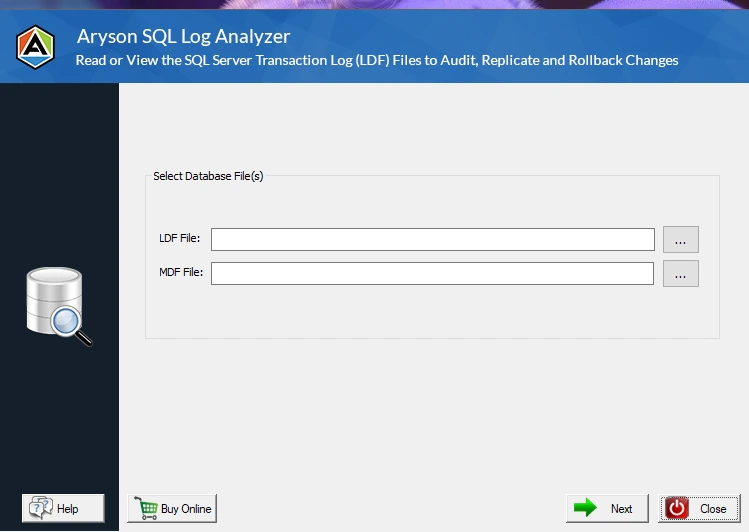
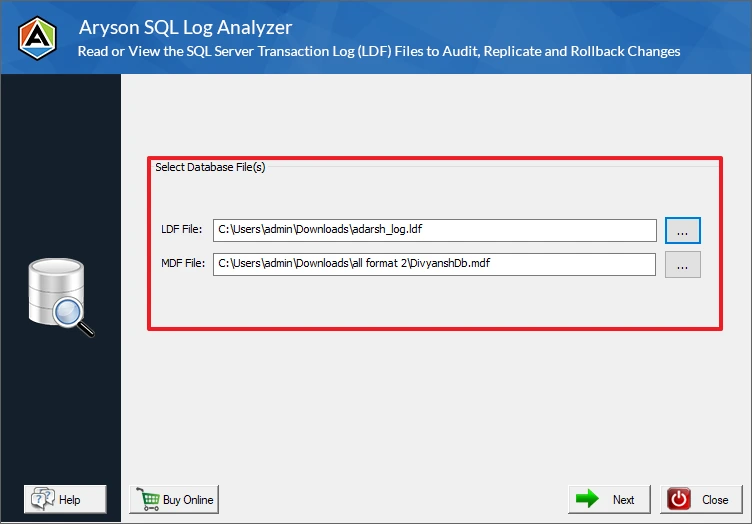
- After that, add the .ldf and .mdf files from your computer system.
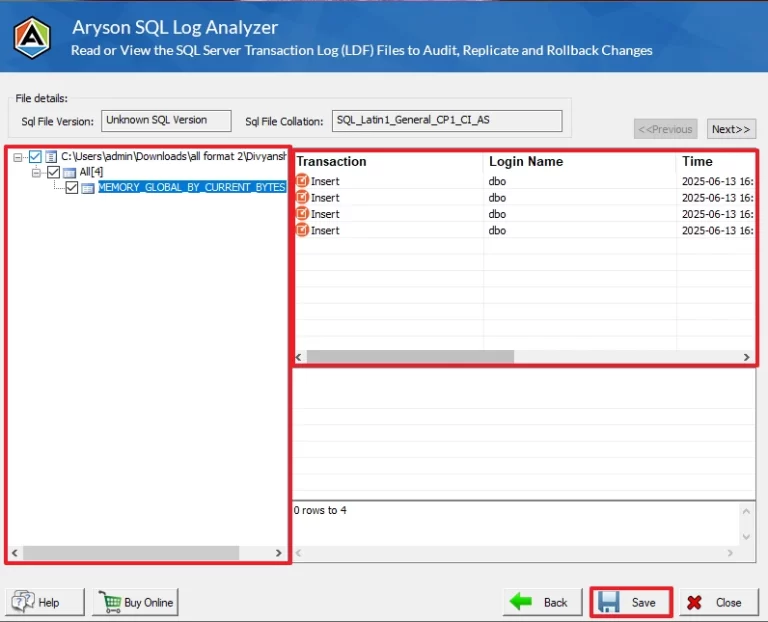
- Then, preview the file’s details displayed on your screen >> Save.
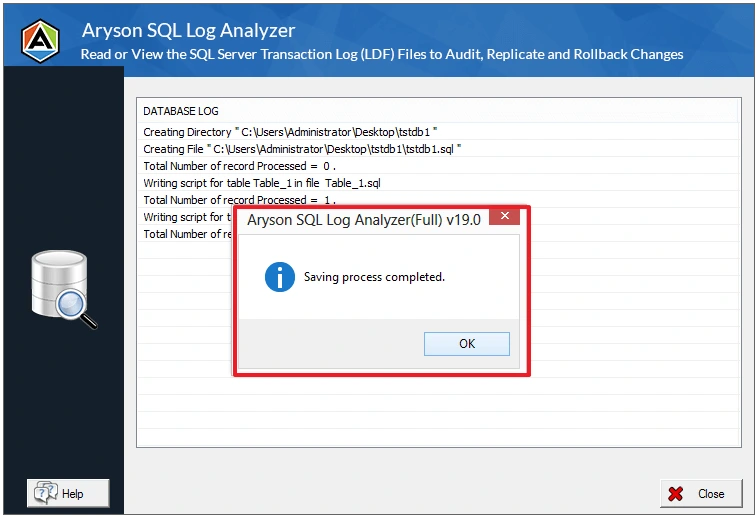
- At last, your files are saved successfully.
Conclusion
To wrap it up, SQL Server Log shipping is a reliable way to keep a database synchronized with a primary database for disaster recovery. It is simple to set up & suitable for most of the business environments. Moreover, regular monitoring is important to make sure backup and restore jobs work properly when needed. In this article, we covered all the methods to accomplish the recovery of server logs. The right approach will accomplish the process smoothly with ease.
Frequently Asked Questions
1. What’s the difference between Log Shipping and Transaction Replication?
Ans. Log shipping ships whole transaction log backups over and restores them – good for keeping a standby copy for disaster recovery. Replication sends individual data changes as they happen, and it’s more about distributing data or feeding reporting servers, not disaster recovery.
2. Which recovery model is required for log shipping?
Ans. Full or Bulk-Logged. Simple recovery model doesn’t keep the transaction log around long enough, so log shipping can’t use it.
3. Is SQL log shipping deprecated?
Ans. Nope. It’s been around since SQL Server 2000, and Microsoft still supports it in current versions. It’s not the newest tech, but it’s proven, and plenty of shops still rely on it, especially when budget or simplicity matters more than instant failover.
4. Can Log Shipping be configured on SQL Server Express?
Ans. No. Express doesn’t include SQL Server Agent, and log shipping needs Agent to run the backup, copy, and restore jobs. So Express can’t be a primary or secondary server for log shipping.
5. Does log shipping support automatic failover?
Ans. No — and this trips people up. Log shipping doesn’t switch over by itself. If your primary server dies, someone has to bring the secondary online manually. It’s a safety net, not an autopilot system.
4.9 based on 1809 user reviewsAbout The Author:

Isha Singh is a content and website optimization expert who helps blogs and businesses grow organically. She specializes in enhancing content quality, improving site structure, and increasing online visibility through smart, practical, and easy-to-implement strategies that drive long-term results.
Related Post