-
Written By Isha Singh
-
Updated on December 24th, 2025
Fix SQL Database Error 3456 in SQL Server
 4.9 based on 1809 user reviews
User Query: “Yesterday, when I was restoring my SQL database, I suddenly encountered a SQL Database Error 3456. Can someone guide me with a quick and reliable fix? I urgently need to export my data securely.”
Overview: The user in the above query asked for a secure and proven fix for the SQL Database Error 3456 taking place. If you also need a fix for this error, read this entire blog. As here in this blog, we will be exploring various fixes along with their step-by-step guide to perform. Still, if none of them helps, you can refer to a recovery solution that is the DataRecoveryFreeeware SQL Recovery tool provided below to recover all your SQL database data. Continue Reading.
What exactly is SQL Server Error 3456?
SQL Database Error 3456 generally takes place when SQL Server is unable to read a specific data page while recovering or restoring a database. This happens because the required page is either missing, corrupted, or damaged. In such instances, SQL Server fails to redo or undo certain transactions, and eventually, this error occurs. You may see this error during startup, crash recovery, or restoration.
When does SQL Server Error Code 3456 happen?
There are a variety of reasons why you may face this error:
- Your database files(NDF or MDF) got corrupted.
- There are some Hardware or software problems, like bad disk sectors occurring.
- Your transaction log records are missing, corrupted, or damaged.
- Your database pages got damaged because of viruses or malware.
- Because of a sudden shutdown, your recovery or restore process got interrupted.
Proven Fixes for SQL Database Error 3456
There are a number of fixes you will come across to fix this error. But here in this section, we will be discussing only the proven once. As per your convenience, you can pick any of the below provided methods.
Fix 1: Applying T-SQL Queries
You can go for the T-SQL commands to fix SQL Database Error 3456 if you are technically decent. You can simply follow steps similar to these:
USE [master]; BACKUP LOG [db1] TO DISK = N'C:\Program Files\Microsoft SQL Server\MSSQL13.MSSQLSERVER\MSSQL\Backup\db1_LogBackup_2018-02-13_05-17-11.bak' WITH NOFORMAT, NOINIT, NAME = N'db1_LogBackup_2018-02-13_05-17-11', NOSKIP, NOREWIND, NOUNLOAD, NORECOVERY, STATS = 5; RESTORE DATABASE [db1] FROM DISK = N'C:\Program Files\Microsoft SQL Server\MSSQL13.MSSQLSERVER\MSSQL\Backup\db1.bak' WITH FILE = 2, NOUNLOAD, STATS = 5; GO |
In most cases, firstly, you have to restore the master database. If needed, you can then run a tail log backup before restoring the affected database.
Sometimes your backup may not be recent or might itself be corrupted. In such situations, you can try the following steps:
- To bring the database online manually, run this command :
ALTER DATABASE mydb SET ONLINE;
- Now, you can check if your database is online or not using the following query:
SELECT name, state_desc FROM sys.databases;
- Next, you have to go through the SQL Server Error logs to see more details about why the database failed to come online.
In case nothing else helps you, you can rebuild your database. To do this, run the command prompt in your PC, navigate to your SQL Server setup folder, and run:
Setup /QUIET /ACTION=REBUILDDATABASE /INSTANCENAME=MyInstance /SQLSYSADMINACCOUNTS=sa /SAPWD=StrongPassword123 |
This will rebuild your database.
Note: If this method appears too lengthy time time-consuming, and complicated to you, you may proceed to the graphical interface fix provided below.
Fix 2: By utilizing SQL Server Management Studio
If you already have a valid backup, you can restore your database using either SSMS (SQL Server Management Studio). Let’s go through the SSMS method step by step:
- Firstly, Start SQL Server Management Studio (SSMS) on your existing PC.
- In the Object Explorer, expand Databases, then right-click and choose the Restore Database option.
- In the Restore Database window, go to the Source section and click the Browse button next to Device.
- Then, in the Select Backup Devices dialog box, click on your device name. If no device is present in the list, click Add and add your backup file.
- Once added, select your backup file and press OK.
- SSMS will now prepare to restore your database. Before the restore starts, it may ask to create a tail-log backup (a final backup of the transaction log). This happens when the database is still active or has uncommitted transactions.
- A warning message will appear about this tail-log backup. Review it, then proceed with the restore process.
By following these steps, you can bring your database back online from a backup using SSMS.
Note: If none of the above fixes work for you to resolve the SQL Database Error 3456, you can recover your database using the recovery software mentioned below.
Automated Recovery Solution: The tool
The DataRecoveryFreeeware SQL Recovery tool is a highly efficient software to recover your affected database in just a few seconds if you are facing SQL Database Error 3456 while opening it. This software makes sure to keep the data secure while restoring a corrupt database. Along with that, it offers you both Standard and Advanced modes to handle database corruption. Also, it is compatible with SQL Server 2008, 2005, and 2000. 2016, and many more. Not only this, you can also resolve the SQL Server 926 Error using the same tool. Now, carefully follow the steps below to recover your corrupted database.
Quick Steps to recover your database are as follows:
- Firstly, install the DataRecoveryFreeeware SQL Recovery tool on your system.
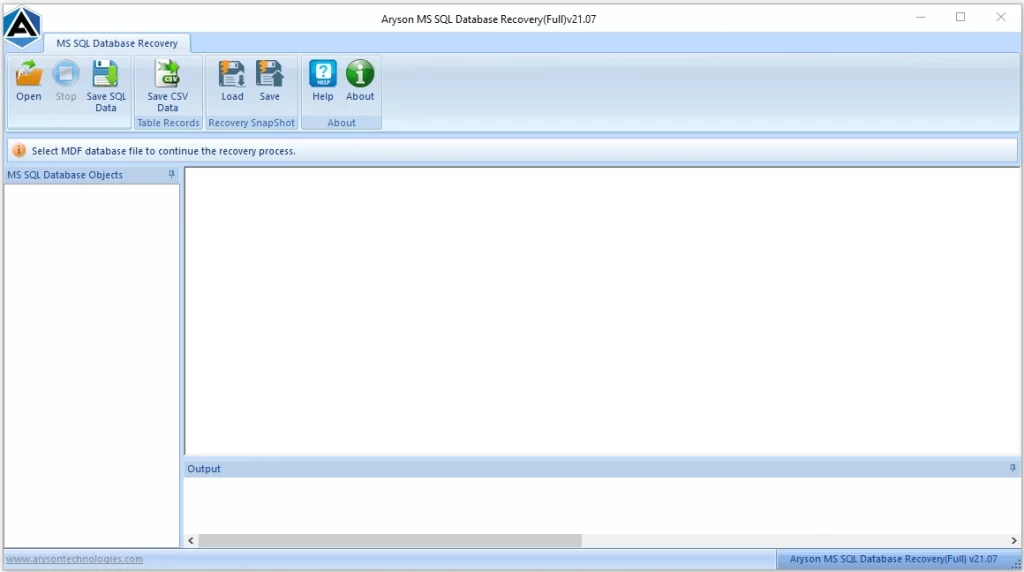
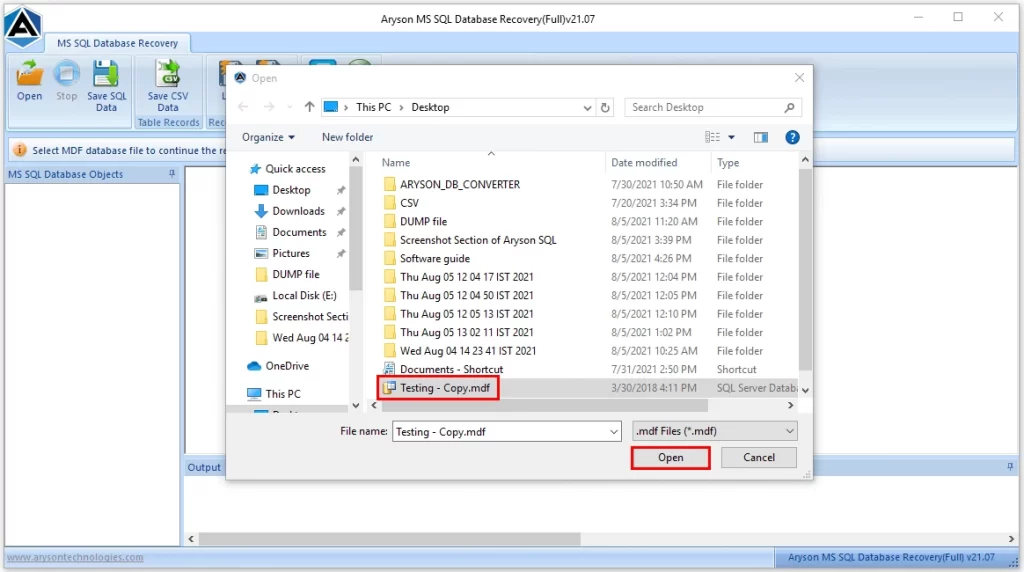
- Then, search for and open your damaged database file.
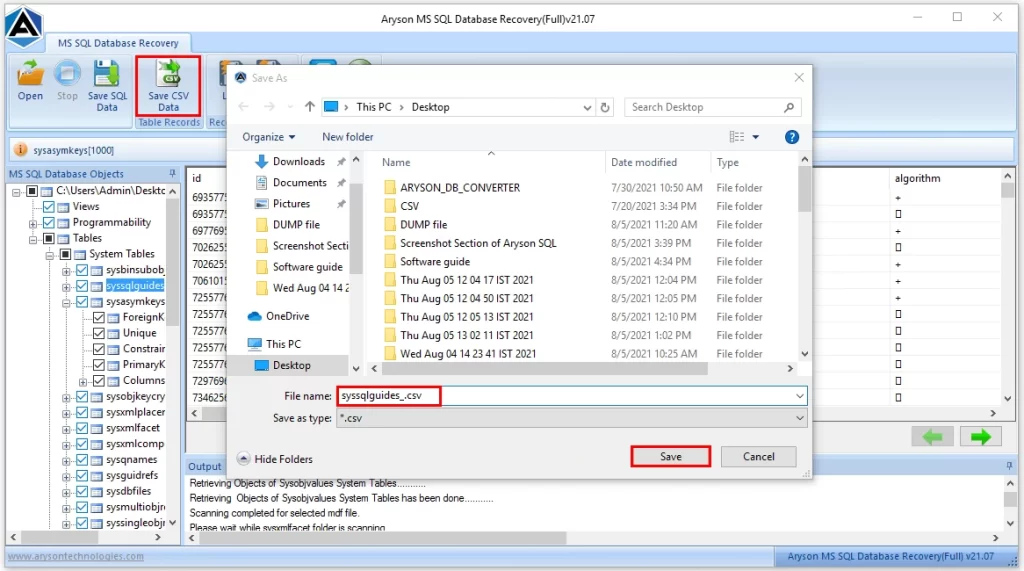
- Next, you can press the Save CSV Data button to save your data in CSV Format.
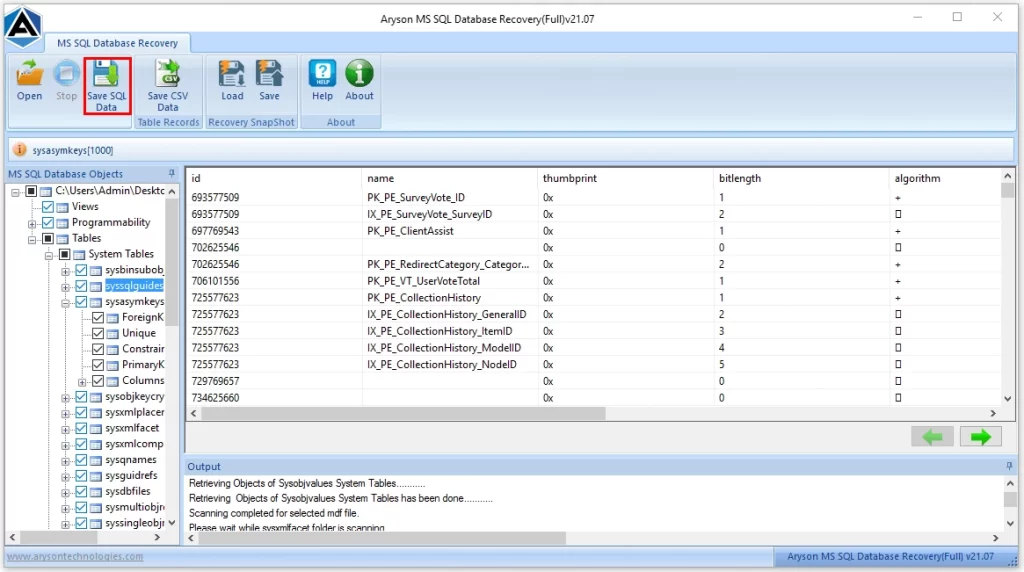
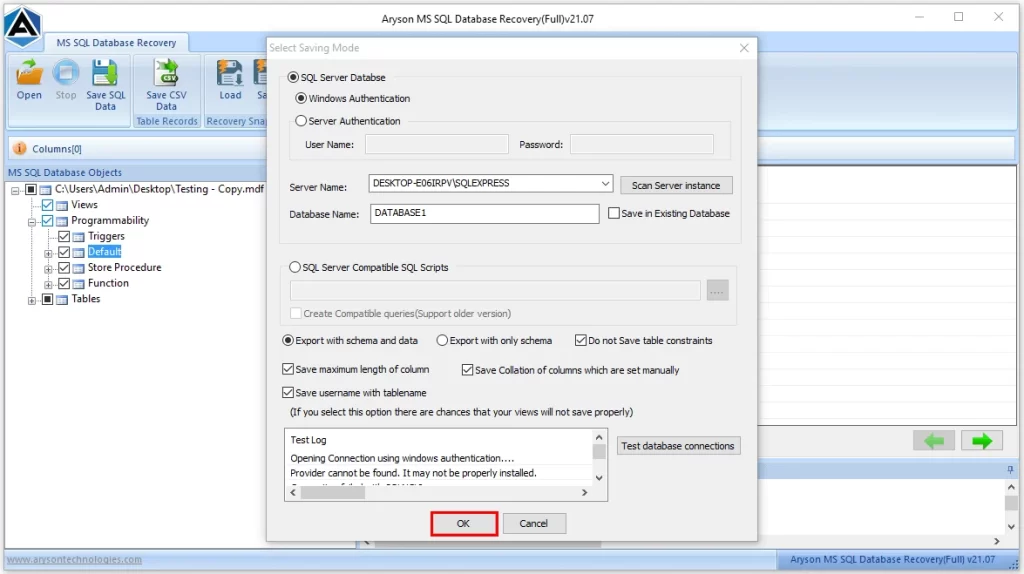
- Now, hit the Save SQL Data button, set the settings as you wish & click OK.
- Once the file is saved successfully, click OK to finish.
If you have followed the above steps carefully, you would have successfully recovered your database.
Conclusion
In the above article, we have explored different fixes for SQL Database Error 3456 along with their detailed steps. Also, you were provided with a DataRecoveryFreeeware SQL Recovery tool to recover your database data if none of the fixes help you. You can pick either of the two fixes, as per your convenience. If you have decent technical knowledge, you can go for T-SQL commands, or else pick the SSMS method. Lastly, refer to the FAQs provided to get insights into the error recovery of your corrupted database.
Frequently Asked Questions
Q.1 What is SQL Database Error 3456?
Ans. It’s an error that takes place when SQL Server fails to read a required page while recovering it due to the corruption or absence of data.
Q.2 Is SQL Server Error 3456 linked to Always On or replication issues?
Ans. Yes, sometimes it appears when replication or Always On availability groups fail to sync pages correctly.
Q.3 How do I fix SQL Error Code 3456?
Ans. You can resolve the Database Error 3456 in SQL Server by using either of the two fixes provided above. And if nothing works for you, you can recover your database using the automated software provided.
Q.4 Can I recover my SQL Server database after Error 3456?
Ans. Yes, you can recover your SQL Server database after Error 3456 using the tool we discussed above. You just have to follow the steps given carefully for successful recovery.
Q.5 How can I prevent Database Error 3456 in SQL Server?
Ans. You can prevent Database Error 3456 in SQL Server by keeping backups on regular basis, running DBCC CHECKDB checks oftenly, monitor error logs, and make sure your hardware and storage are not damaged.
4.9 based on 1809 user reviewsAbout The Author:

Isha Singh is a content and website optimization expert who helps blogs and businesses grow organically. She specializes in enhancing content quality, improving site structure, and increasing online visibility through smart, practical, and easy-to-implement strategies that drive long-term results.
Related Post