-
Written By Rohan Wiese
-
Updated on April 21st, 2026
How to Resolve Outlook Error 0x80070021 in Simple Steps
 4.9 based on 1809 user reviews
Have you ever run into Outlook Error 0x80070021 when try to open your emails, and couldn’t figure out why it happens? This error in Microsoft Outlook usually shows up when another program is using the same file, which stops you Outlook to finish the task. Moreover, it may disrupt your workflow and make email management more difficult, particularly when you need immediate access. In this article, we will cover the year 2026 most reliable approaches that fix the Outlook error and a professional Outlook PST Recovery Software.
TL;DR: The error appears when Outlook can’t access a file due to conflicts or restrictions. You can fix it by closing background apps, disabling add-ins or antivirus software, checking permissions, or using a PST repair tool if the file is damaged.
Understand About Outlook 0x80070021 Error
Outlook Error Code 0x80070021 is a Windows-related error that occurs when Outlook tries to access a file that is used by another process. It appears with a message that indicates that the file cannot be accessed because it is locked. These issues occur when users export Outlook data to a PST file or access large PST files.
Causes of 0x80070021 Outlook Error
It is important to understand the root cause of error Code 0x80070021, which can help you to fix the problem in a more effective way.
- It occurs when another program or background process may access the same file.
- When the security software may block the Outlook operations.
- Moreover, the faulty or incomplete add-ins can interrupt the processes.
- When there is a lack of proper file access permissions.
- Likewise, when users handle oversized PST files can cause export failures.
Best Methods to Fix Outlook Error 0x80070021
Below are some of the effective solutions you can try to resolve this issue:
Method 01: Close All Running Applications
Sometimes, this error occurs because another application is using the same file.
- Start by closing Microsoft Outlook.
- Then, you need to press Ctrl + Shift + Esc to open Task Manager.
- Now, end all Outlook-related processes.
- Next, you need to restart Outlook and try again.
This makes sure that no file is locked by another process.
Method 02: Disable Antivirus Temporarily
Antivirus programs may interfere with Outlook operations.
- To disable the antivirus, you need to open your antivirus software.
- Subsequently, temporarily disable real-time protection.
- Afterward, try exporting the PST file again.
Method 03: Run Outlook in Safe Mode
When you run Outlook in Safe Mode, you can prevent Outlook 0x80070021. Therefore, it helps to identify the add-in issues.
- On your system, you need to press Windows + R.
- After that, in the blank field type outlook.exe /safe and then press Enter.
- Thereafter, try to perform the export again.
Method 04: Disable Faulty Add-ins
- To start this method, first Open Microsoft Outlook.
- Now, go to the File tab and then click on Options >> Add-ins.
- Next, select COM Add-ins and click Go, and uncheck all add-ins.
- After that, you need to restart Outlook.
Method 05: Check File Permissions
This makes sure that you have proper access to the file location on your computer.
- First, you need to right-click the PST file or folder.
- After that, select Properties >> Security.
- Then, make sure your user account has full control.
- At last, apply the changes and retry.
Method 06: Professional Recovery Software for Outlook Error 0x80070021
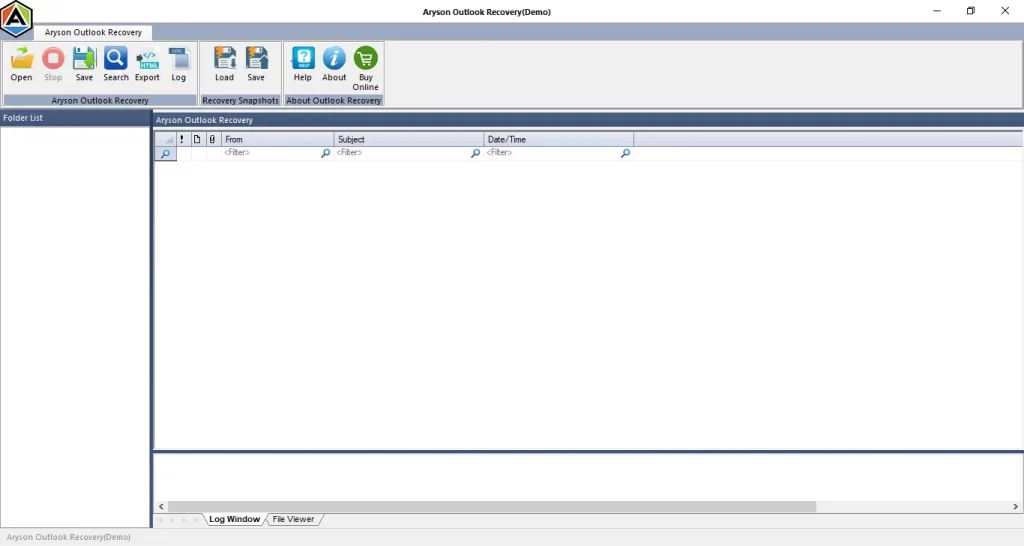
If your Outlook PST file is corrupted and displaying errors like 0x80070021, you can use the Outlook PST Recovery Tool to fix the issue. This software is made to repair damaged PST files and resolve alignment-related problems without affecting your data. Also, it helps with Outlook Error 0x80040600, which allows users to recover their emails. In addition, this tool works on both Windows and Mac systems, which makes it a flexible option for users.
Note: If you encounter the Outlook error 0x80040116 or 0x8004010f, then read our detailed guide.
Easy steps to recover the file:
- Download the Outlook PST Recovery Tool on your system.
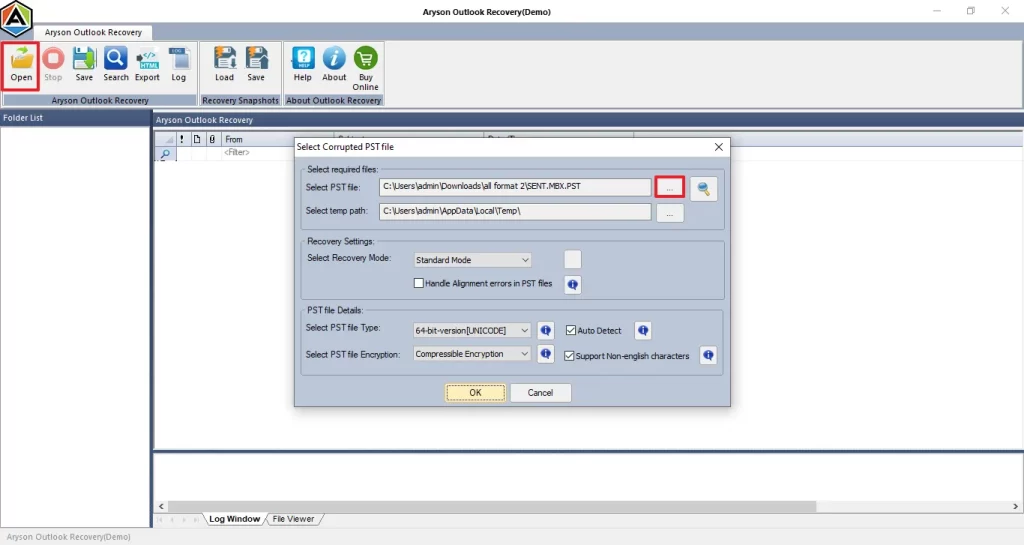
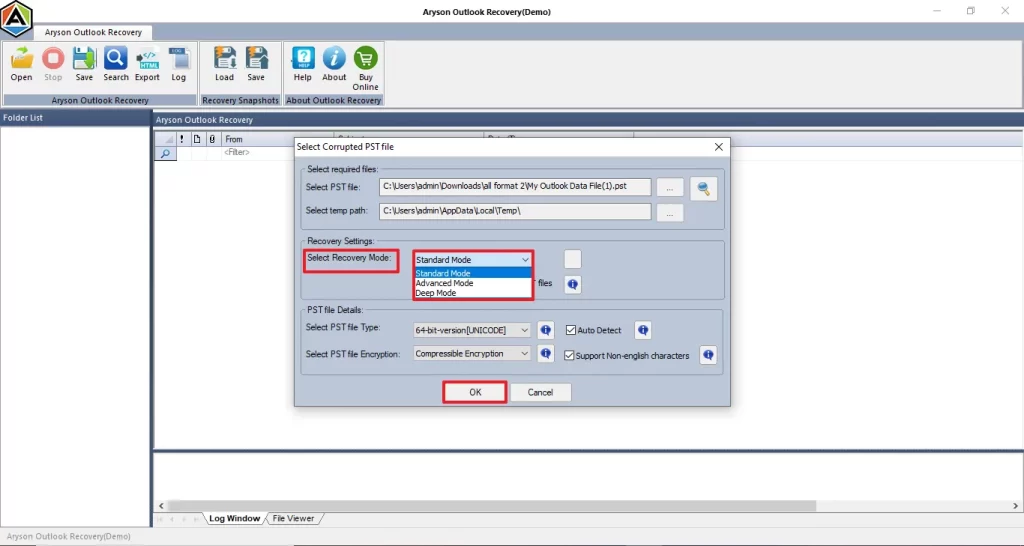
- Then, you need to choose the PST file you want to repair.
- Thereafter, select the preferred scanning mode and proceed with further.
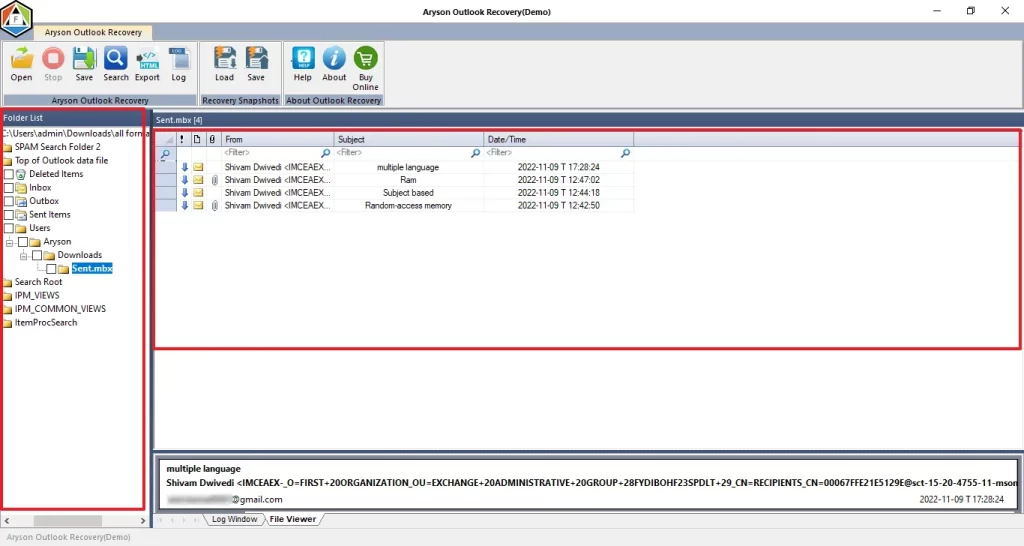
- After the completion, preview the recovered emails in the folder tree.
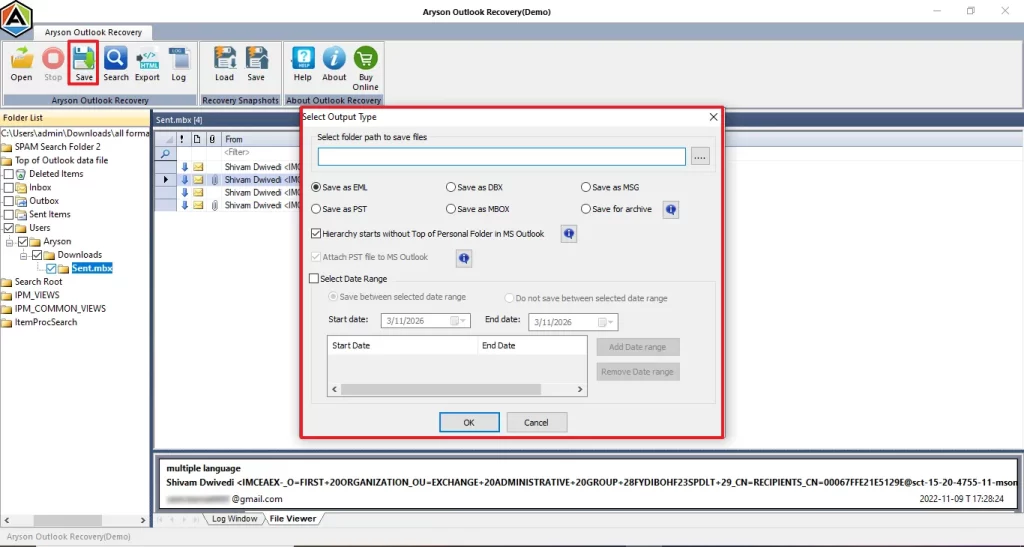
- Finally, select a saving format, apply any needed filters & complete the process.
Preventive Tips to Avoid Error 0x80070021
To prevent this error in the future, follow these best practices:
- It keeps a regular backup of your Outlook data.
- Make sure to disable the unnecessary add-ins to prevent this error.
- Moreover, use professional software for advanced security.
- You need to close the unused applications when you’re working in MS Outlook.
Conclusion
When Outlook does not perform well, it makes difficulty to back up data. Follow this guide and identify the root cause, and then apply the method to resolve the problem. With the best practice, you can prevent the Outlook error 0x80070021 and make sure a smooth performance.
Frequently Asked Questions
1: What exactly does Outlook Error 0x80070021 mean?
Ans. It indicates that Outlook cannot access a file because it is being used by another process or application.
2: Why do I get Outlook error code 0x80070021 when exporting PST?
Ans. This usually happens when the PST file is locked, too large, or being accessed by another application.
3: What triggers Outlook Error 0x80070021?
Ans. Common triggers include antivirus interference, add-in conflicts, file corruption, or insufficient permissions.
4: Is 0x80070021 a common Outlook issue?
Ans. Yes, it is a relatively common error, especially during PST export or backup operations.
5: Can Outlook add‑ins cause error 0x80070021?
Ans. Yes, faulty or incompatible add-ins can interrupt Outlook processes and lead to this error.
4.9 based on 1809 user reviewsAbout The Author:

Rohan Wiese is a content and website optimization expert who helps blogs and businesses grow organically. He specializes in enhancing content quality, improving site structure, and increasing online visibility through smart, practical, and easy-to-implement strategies that drive long-term results.
Related Post