-
Written By Isha Singh
-
Updated on May 28th, 2026
How to Fix MS Access Database Error 3112 (Record(s) Cannot Be Read)
 4.9 based on 1809 user reviews
MS Access Database Error 3112 usually appears when the database cannot read some records properly. This error may happen because of database corruption, damaged files, or hardware problems. Due to this issue, users may not be able to open or access their database data. In this article, we will explain simple methods to fix the MS Access Error 3112 easily, which include the DataRecoveryFreeware MS Access Database Repair Tool in a simplified way.
What is MS Access Error 3112?
MS Access is a runtime error that states as “Record(s) Cannot Be Read; no read permission on ‘ObjectName’”. This occurs when the Microsoft Jet or Access Database Engine restricts a user from reading data from a specific table, query, or system object. In most of the cases, incorrect Microsoft Access database permissions can also trigger this error.
Additionally, it occurs when Microsoft Access cannot read records from an MDB or ACCDB file because of database corruption or damaged objects.
Common Causes of MS Access Database Error 3112
- Damaged database files can prevent Microsoft Access to read records properly and completely.
- Users without proper database permissions may face record-reading errors in Microsoft Access files.
- The corrupted tables or indexes can cause Access database records to become unreadable suddenly.
- An unstable network connections can interrupt database access and damage shared Access database files.
- Unexpected runtime errors can affect database performance and make some records inaccessible in Access.
Methods to Fix MS Access Database Error 3112
Follow the given methods to fix the Error 3112 and restore access to the unreadable database.
- Compact and Repair Utility
- Processional Access Database Recovery Tool
Method 01: Use Compact and Repair Utility
- You need to open Microsoft Access on your computer.
- Click on the File tab and select Open and browse the damaged MDB or ACCDB file.
- Do not open the database directly and click the small arrow beside the Open button.
- Choose Open Exclusive from the dropdown list.
- After opening the database, go to the Database Tools tab >> Compact and Repair Database.
- Wait until the repair process is completed.
- Once finished, restart your MS Access >> check the database file again.
Drawbacks of the Manual Method
- It may fail to repair severely corrupted MDB or ACCDB database files.
- Sometimes, deleted records cannot be recovered through this manual method.
- The utility may not repair damaged forms or macros completely.
- Large database files can take a long time to repair.
- It cannot fix permission-related issues automatically in shared databases.
- The repair process may stop unexpectedly if the network connection is unstable.
Method 02: Use the Professional Access Database Recovery Tool
The MS Access Database Repair Tool is reliable for all types of MDB and ACCDB repair, including Error 3112. This software helps users to repair all types of major and minor errors. Its advanced scanning option helps to analyse and repair all the corrupt and damaged files. This software is capable of fixing Microsoft Access Database Error 2950 in a hassle-free manner.
Step-by-Step Working Process to Fix MS Access Runtime Error 3112
- Download and install the MS Access Database Repair Tool on your device.
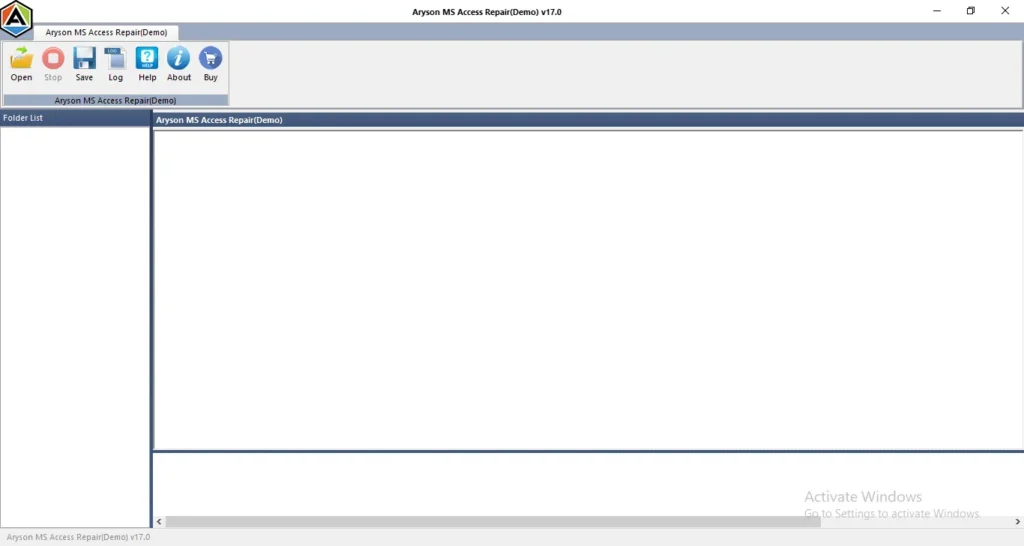
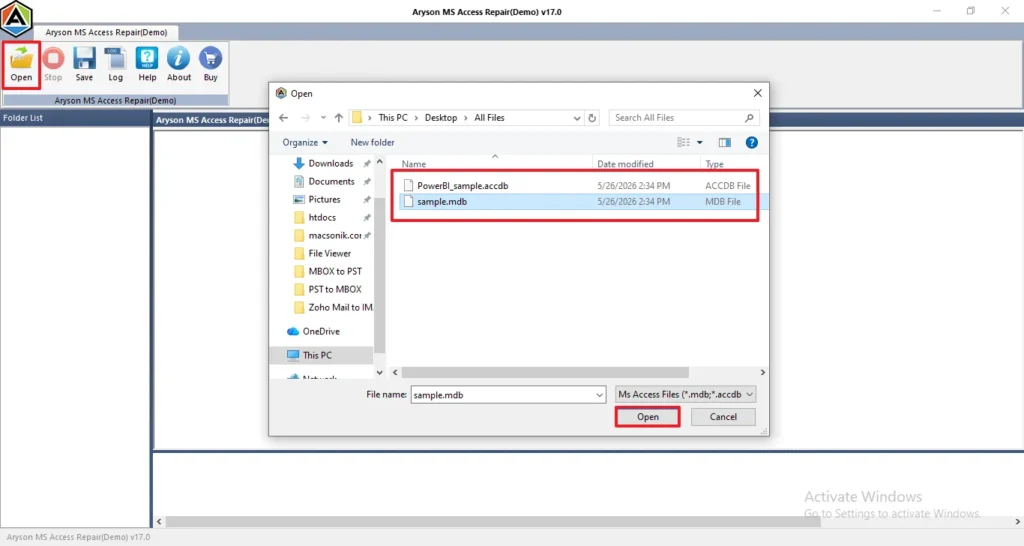
- Now, click on open and browse the .mdb and .accdb files >> Open.
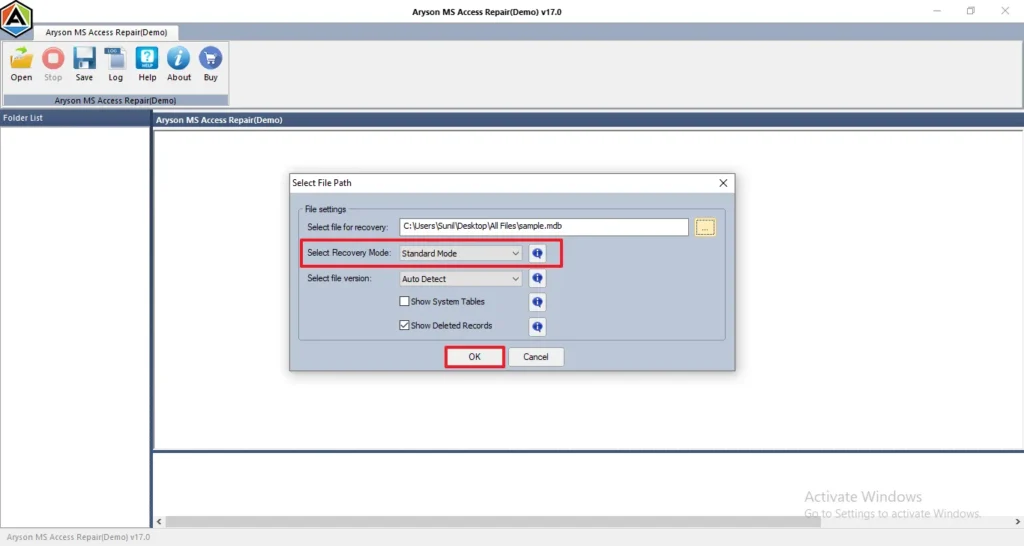
- Choose the recovery mode, such as Standard and Advanced Mode, and click OK.
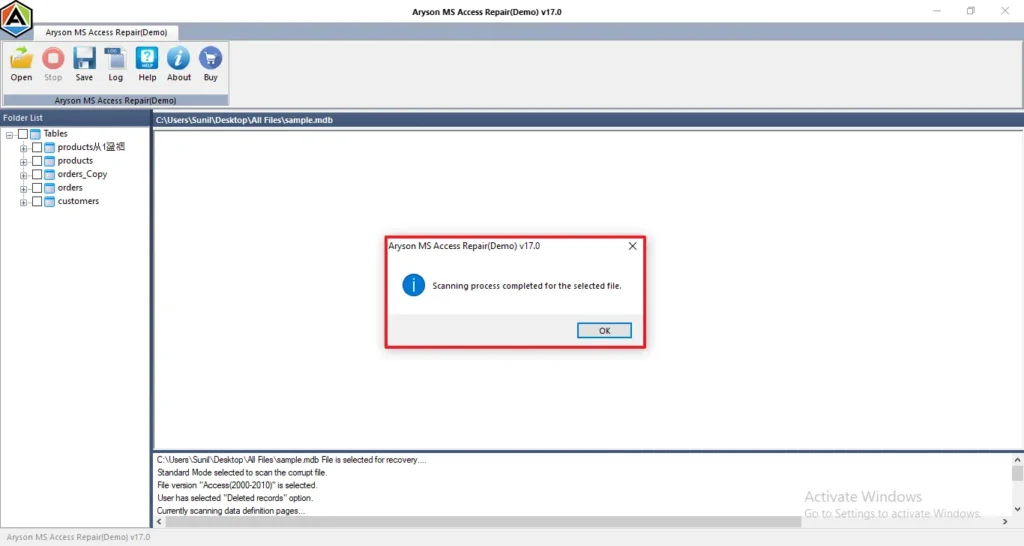
- A pop-up message appears, which shows that the Scanning Process has completed.
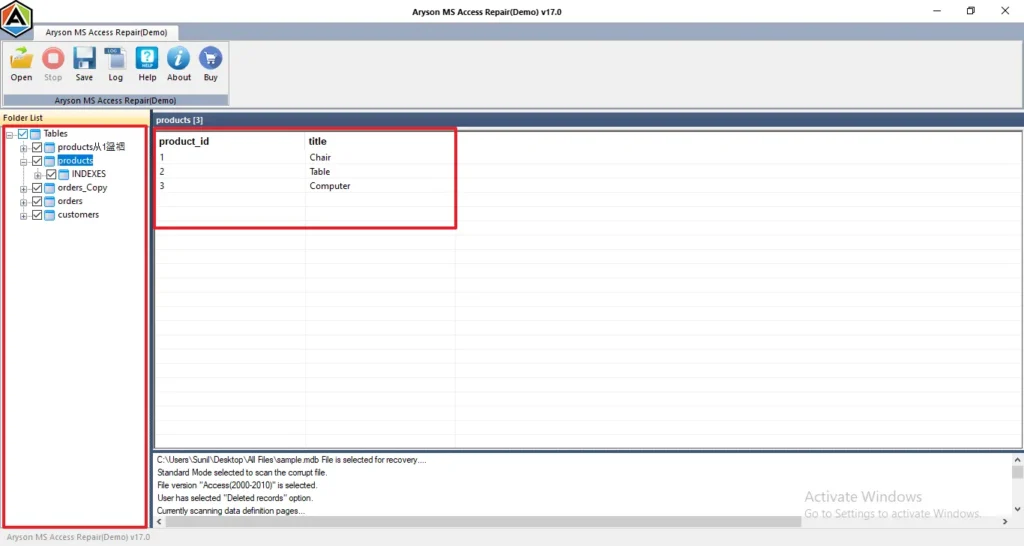
- You can preview the scanned folders and view the details by clicking on any folder.
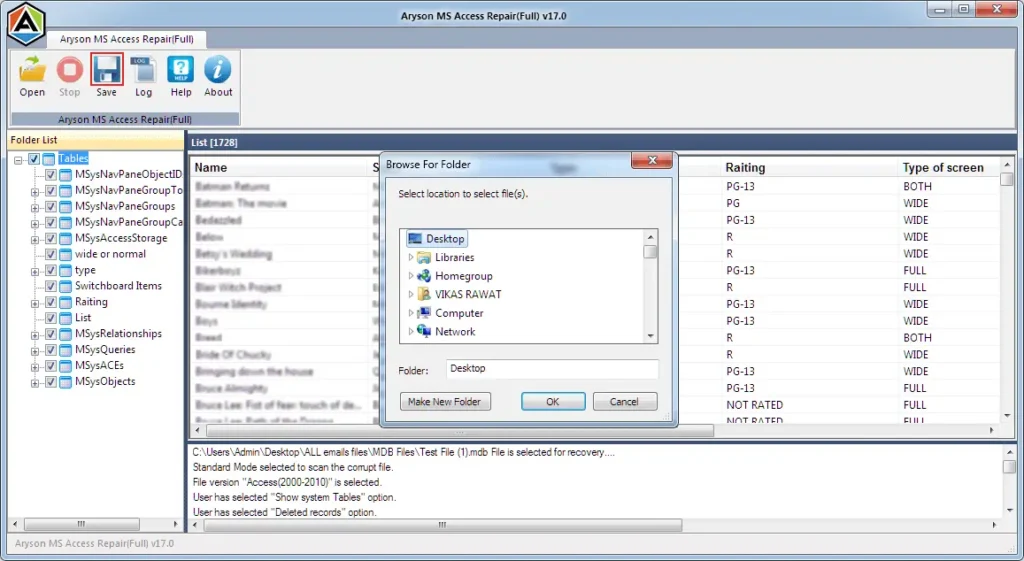
- Finally, click on Save to save your recovery files.
How to Prevent MS Access Database Corruption?
- Always keep regular backups of the important files.
- Keep in mind to avoid sudden shutdowns.
- Make sure that the software does not have an antivirus.
- You need to avoid the oversized database files.
- Maintain stable internet connectivity to avoid interruption.
Difference Between MDB and ACCDB Files
| MDB | ACCDB |
| Older Access format | Newer Format |
| Less Secure | Better Security |
| Used in Access 2003 | Used in Access 2007+ |
Conclusion
MS Access Error 3112 is frustrating, and most of the time it comes down to permissions or a damaged file. First, check if the user has read access to the table. If permissions look fine, then look at the database file itself. Run the Compact and Repair tool and see if that clears things up. If the file is genuinely corrupted, there are recovery options available. Keep your network connection stable if it’s a shared database to avoid any errors.
Frequently Asked Questions
1: How do I find corruption in an Access database?
Ans. Database corruption can be identified through missing records, unusual error messages, slow performance, or failure to open MDB and ACCDB files.
2: How can I recover an Access database after corruption or runtime errors?
Ans. You can use the Compact and Repair utility, restore a backup, or use an MS Access database recovery tool to recover damaged database files.
3: Can I use Microsoft Access Runtime without a full Access license?
Ans. Yes, Microsoft Access Runtime allows users to run Access databases without installing the full Microsoft Access application.
4: Does Microsoft Access require a license to open ACCDB or MDB files?
Ans. Yes, the full Microsoft Access application requires a valid Microsoft Office license. However, Access Runtime can open database files for free.
5: What does MS Access Database Error 3112 indicate when compacting an MDB file?
Ans. Error 3112 during MDB compaction usually indicates corrupted records, damaged database objects, or missing read permissions in the database file.
4.9 based on 1809 user reviewsAbout The Author:

Isha Singh is a content and website optimization expert who helps blogs and businesses grow organically. She specializes in enhancing content quality, improving site structure, and increasing online visibility through smart, practical, and easy-to-implement strategies that drive long-term results.
Related Post