-
Written By Rohan Wiese
-
Updated on December 18th, 2025
How to Quickly Resolve SQL Server Error 8942 Issues?
 4.9 based on 1809 user reviews
User Query: “Today, when I was running a query on my SQL Server database, suddenly the SQL Server error 8942 occurred. An error message is appearing frequently, saying something about overlapping row slots in a table. I have not modified any settings either, so I don’t know about the cause of this issue. Can anyone provide me a secure way to resolve this error without losing any important information from my database?”
Overview: SQL error code 8942 occurs when there is corruption in the table or data page. This issue often occurs due to hardware issues, unexpected shutdowns, or data inconsistencies. You may lose your important data or face interruptions while performing database operations. To help you resolve this issue, we will tell you about some causes of this issue and some of the possible ways to resolve the 8942 error. Also, you will come across the DataRecoveryFreeware SQL Recovery Tool, along with the correct steps to recover your database. But before that, let me tell you about the root causes of the error.
What Exactly Is SQL Server Error 8942?
SQL Error 8942 occurs when a data page in a table becomes corrupted. That corrupted page causes the overlapping of the row slots. The error appears like this:
| Msg 8942, Level 16, State 1 Table error: Object ID <O_ID>, index ID <I_ID>, page <P_ID>. Test (<TEST>) failed. Slot <S_ID>, offset 0x,<ADDRESS> overlaps with the prior row. |
Root Causes of Microsoft SQL Server error 8942 code
Given below are some of the root causes behind the SQL Database Error 8942:
- The corruption of the Data page causes the overlapping of row slots.
- This error can be caused by hardware failures such as faulty disks or memory issues.
- Additionally, unexpected shutdowns or power outages can also cause this error.
- You may have bugs in your software, or there might be issues in the SQL Server version.
- The user has not updated large tables correctly.
How to Fix SQL Server Error 8942?
There are various fixes available for troubleshooting SQL Error 8942, the error 8942. Go through each method carefully and try them to easily resolve the issue in your SQL Server.
Fix 1: Identify Potential Hardware Issues
Hardware Problems can also be the reason behind the occurrence of SQL Error 8942. Therefore, to resolve this error, start by carefully reviewing your system, the application, and SQL Server error logs to detect any faulty components there. In case there is any issue with hard disks, memory, or any other hardware. You should replace or repair them as quickly as possible in order to make sure that there is no further corruption.
Fix 2: Using the DBCC CHECKDB Command to Assess the Damage
If there is no issue with your hardware, simply run the DBCC CHECKDB command. This command will basically analyze the database and indicate the appropriate repair strategy. After identifying the correct parameter to repair, rerun DBCC CHECKDB with that option to resolve the corruption securely.
Steps to Fix are as follows:
- To begin, run the DBCC CHECKDB without any repair options to identify corruption:
| DBCC CHECKDB (‘YourDatabaseName’) WITH NO_INFOMSGS; |
- Then, review the output to determine the required repair (REPAIR_REBUILD or REPAIR_ALLOW_DATA_LOSS).
- After that, make sure to take a full database backup before starting the repair.
- Now, again run the DBCC CHECKDB with the valid repair option:
| DBCC CHECKDB (‘YourDatabaseName’, ‘REPAIR_REBUILD’); |
- Finally, verify database integrity by rerunning the DBCC CHECKDB command and restoring the missing data if required.
Important Note: The above two fixes will help you resolve the error. But in case none of them work for you, try the alternative solution below. It will help you recover your SQL Server quickly in order to keep all your data secure.
Fix 3: Advanced Solution to Troubleshoot SQL Server error 8942
Sometimes, error 8942 takes place due to the corruption of MDF files. Repairing these damaged files with the help of the DataRecoveryFreeware SQL Recovery Tool can resolve the issue. This software can repair and restore corrupted or damaged MDF files within seconds without affecting the data integrity. It can recover your essential database objects like tables, views, indexes, rules, and queries. Additionally, it allows you to export the repaired SQL database directly to SQL Server, Excel, CSV, or SQL-compatible script formats. Also, it offers two different recovery modes: Standard and Advanced, according to the level of corruption. Users can also resolve the Outlook Error 0x80040154 by using DataRecoveryFreeware.
Now, follow the recovery steps below to fix error 8942.
Simplified Steps to SQL Server Error 8942:
- Install and run the SQL Recovery Tool on your existing system.

- Then, click the Open button and load the corrupted MDF file into the software.

- After that, choose either Standard or Advanced recovery mode >> click OK.

- Now, select the Save CSV Data option to save your recovered files.

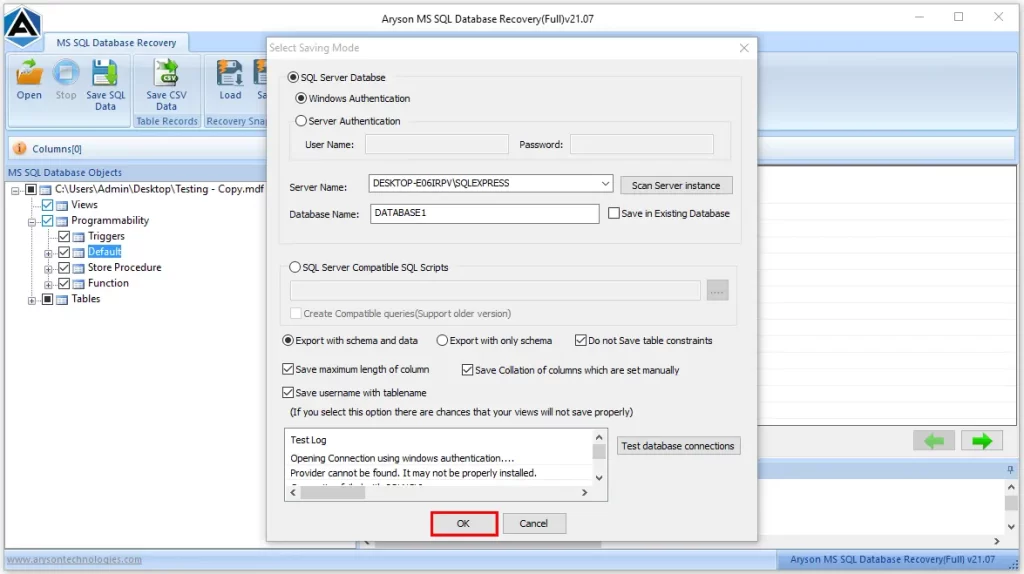
- Then, click on the Save SQL Data button >> modify settings if required >> and hit OK.

- Finally, press the OK button to start the recovery process.
Conclusion
In a nutshell, the SQL Server error 8942 occurs due to corruption in data pages, but it can be resolved if you use the right approach. The manual fixes, like hardware checks and running the DBCC CHECKDB command, can fix the minor issues; you can resolve the severe MDF corruption by using the automated solution above. But at the end, it is important to follow the right steps irrespective of the fix you are using. So, make sure to follow the steps of recovery properly to avoid errors.
Read More: View OST File Without Outlook
Frequently Asked Questions
Q-1: What causes SQL Server Error 8942?
Ans- The SQL Server Error 8942 is caused by data page corruption, hardware failures, unexpected shutdowns, and corruption of MDF files.
Q-2: Can SQL Server Error 8942 cause data loss?
Ans- Yes, SQL Server Error 8942 may cause data loss.
Q-3: Is SQL Server Error 8942 related to database backups or restores?
Ans- Yes, if your MDF file is already corrupted, restoring or backing up the database may trigger or reveal this error.
Q-4: How can I prevent SQL Server Error 8942 from happening again?
Ans- Use reliable hardware, avoid abrupt shutdowns, keep SQL Server updated, and maintain regular backups with integrity checks.
Q-5: Is SQL Server Error 8942 related to corruption in the database?
Ans- Yes, this error is a direct indication of data page corruption within the database.
4.9 based on 1809 user reviewsAbout The Author:

Rohan Wiese is a content and website optimization expert who helps blogs and businesses grow organically. He specializes in enhancing content quality, improving site structure, and increasing online visibility through smart, practical, and easy-to-implement strategies that drive long-term results.
Related Post