-
Written By Rohan Wiese
-
Updated on August 25th, 2025
Fix SQL Server 18456 Error: Login Failed for User SA
 4.9 based on 1809 user reviews
Summary: When users work with Microsoft SQL Server, the most common issue that occurs before users is the SQL Server 18456 Error. This error usually activates when you try to log in with the SA account or any SQL login, but the authentication fails. The error seems very simple, but it can occur for many reasons, ranging from wrong credentials to server authentication settings. In this guide, we will explain what causes the SQL Server Error 18456, the different states of the error, and step-by-step methods to fix it using DataRecoveryFreeware SQL Database Recovery Software.
What Causes 18456 SQL Server Authentication?
This error is linked to failed authentication attempts. Some of the common reasons include:
- The SA password might be wrong, expired, or recently changed.
- If SQL authentication is disabled, you’ll face this issue.
- Sometimes, the SA account is disabled for security reasons.
- The login may not have the required access to the server or database.
- Issues in the master or user databases can also trigger login problems.
How to Fix SQL Server 18456 Error
Here are some tested solutions to resolve this error:
Solution 1: Check Username and Password
The very first step is to double-check your username and the correct password before logging in. If you are not sure about the password, reset the SA password using SQL Server Management Studio.
Solution 2: Enable SQL Server Authentication
The SQL Server is the default server for Windows Authentication mode. To allow SQL logins enable SQL Server Authentication:
- Open SSMS and connect with Windows Authentication.
- Right-click on the server name > Properties.
- Go to Security.
- Select SQL Server and Windows Authentication mode.
- Restart SQL Server services.
Solution 3: Enable the SA Account
If the SA account is disabled, you can follow these steps for fixing 18456 Login Failed for User:
Connect via Windows Authentication.
- Go to Security >> Logins >> SA.
- Right-click > Properties > Status.
- Select Enabled and assign a strong password.
Solution 4: Repair Corrupt Databases to fix Login Failed for SA 18456
In some rare cases, when the data is corrupted in the system or user databases, it can cause repeated login errors. If corrupted files are suspected, the user should restore a Corrupt SQL Backup File Database
Solution 5: Easy and Fast Solution to Fix SQL Server 18456 Error
When the file is corrupted or damaged SQL database files, SQL Database Recovery Software is a reliable tool to repair and restore. It can easily recover tables, views, triggers, and other objects while preserving data integrity. It can restore Corrupt SQL Backup File database and severe corruption. This software offers flexible saving options and supports all major SQL Server versions.
- Run the SQL Database Recovery Software on your PC.
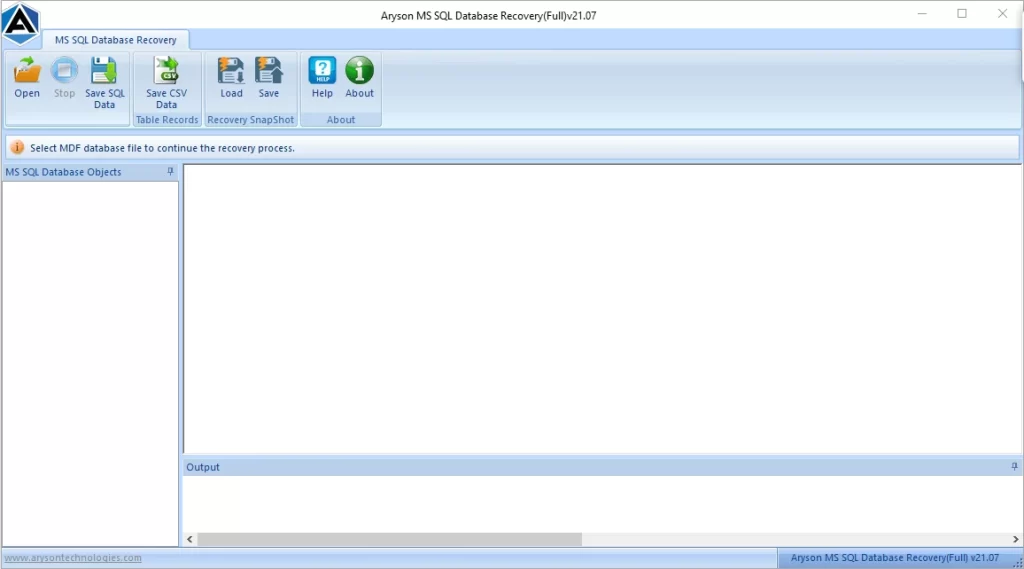
- Click on Browse and select your MDF or LDF file to recover.
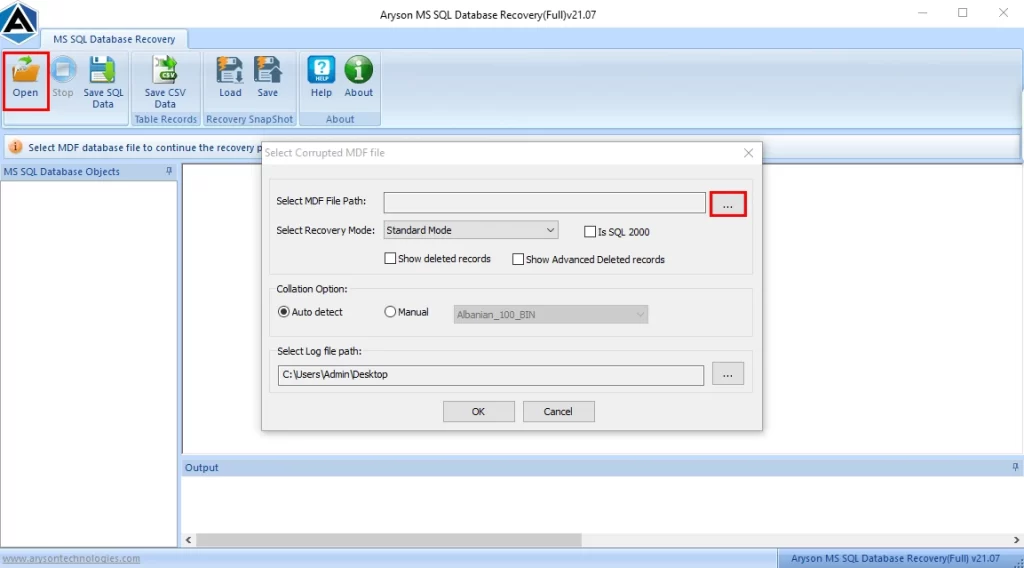
- Select the files that need to be restored and click OK.

- Click on “Save SQL Data/Save CSV Data” to fix the Microsoft SQL Server 18456 Error.

- Lastly, select the options and click on OK.

Final Words
The SQL Server 18456 Error can be very complex, but with the right troubleshooting, it is easy to fix. But it is a simple password reset, enabling authentication mode, or repairing corrupt databases; the above-given solutions make it smooth SQL Server access without disruption. Always keep your SA credentials secure and perform regular backups to avoid future login issues.
Frequently Asked Questions
Q.1 Why does SQL Server show ‘Login Failed for User SA’?
Ans. It happens due to wrong credentials, a disabled SA account, or an incorrect authentication mode.
Q.2 How do I fix 18456 Login Failed for User SA?
Ans. Enable SQL Authentication, reset the SA password, and ensure the account has proper permissions.
Q.3 What does ‘Microsoft SQL Server Error 18456’ mean?
Ans. It means that the login request failed, either due to wrong credentials, a disabled login, or an authentication mode mismatch.
Q.4 How do I enable SQL Server Authentication to avoid 18456 errors in future?
Ans. Go to server properties >> Security >> enable SQL Server and Windows Authentication mode, then restart the services.
Q.5 What is the 18456 SQL Server Authentication error state?
Ans. The error state is a code that points to the root cause of login failure, such as a wrong password, a disabled account, or database not accessible.
4.9 based on 1809 user reviewsAbout The Author:

Rohan Wiese is a content and website optimization expert who helps blogs and businesses grow organically. He specializes in enhancing content quality, improving site structure, and increasing online visibility through smart, practical, and easy-to-implement strategies that drive long-term results.
Related Post