-
Written By Rohan Wiese
-
Updated on July 22nd, 2025
How to Restore Corrupt SQL Backup File Database Easily
 4.9 based on 1809 user reviews
Summary: MS SQL is a widely used database platform, trusted for its performance and reliability. Despite its robustness, SQL databases may show errors due to file corruption or unexpected failures. This blog explores practical methods to restore corrupt SQL backup file database and regain secure login access. We also introduce a reliable SQL Database Recovery Tool for a quick restoration of corrupt backup files. The tool minimizes downtime and ensures your critical data is restored safely and efficiently.
Why do We Need to Repair Corrupt SQL Backup File?
Repairing a corrupt SQL backup file is essential for several critical reasons:
- Repairing the backup file protects your database from becoming inaccessible.
- Fixing a corrupted bak file ensures continuity of the operation without downtime.
- If your backup file fails to restore, you might lose access to the access of a database.
- Repairing the database file saves time and reduces manual work to save effort.
- Fixing the database reduces the load on your hardware and safeguards it from hardware faults.
Manual Method to Restore Corrupt SQL Backup File Database
Several manual methods are available to restore your database from corruption. Follow the steps to restore your database and run the database query smoothly.
- Download and install the SQL Server Management Studio (SSMS) application on your system.
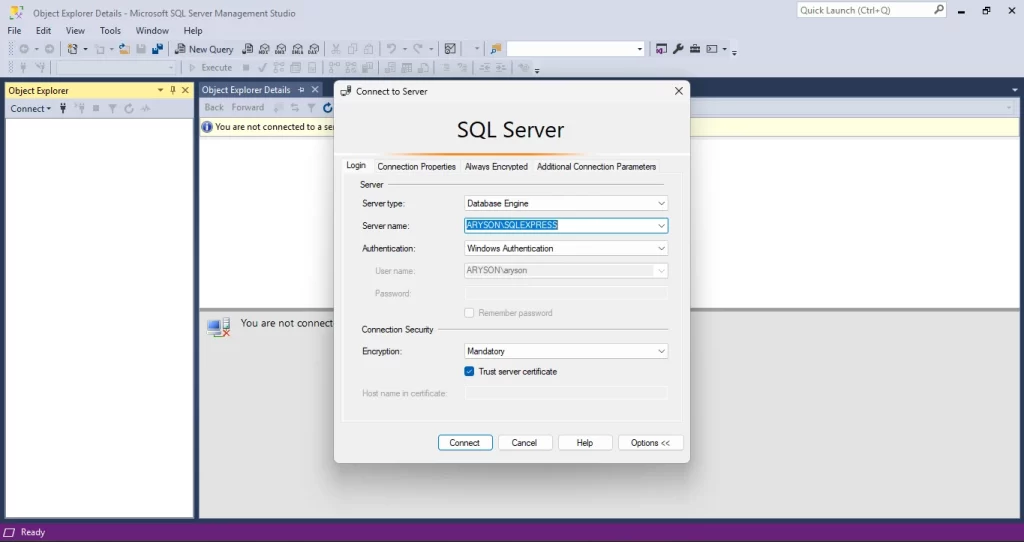
- After that, connect the SQL server with the SSMS application via login.
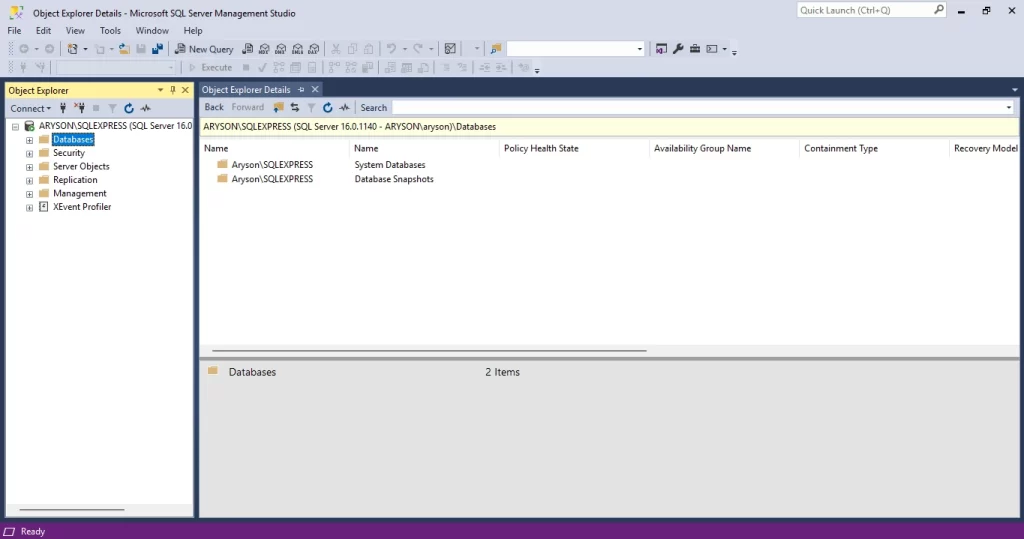
- Navigate to Object Explorer and select the Database section.
- After that, right-click on it and choose the Tasks option.
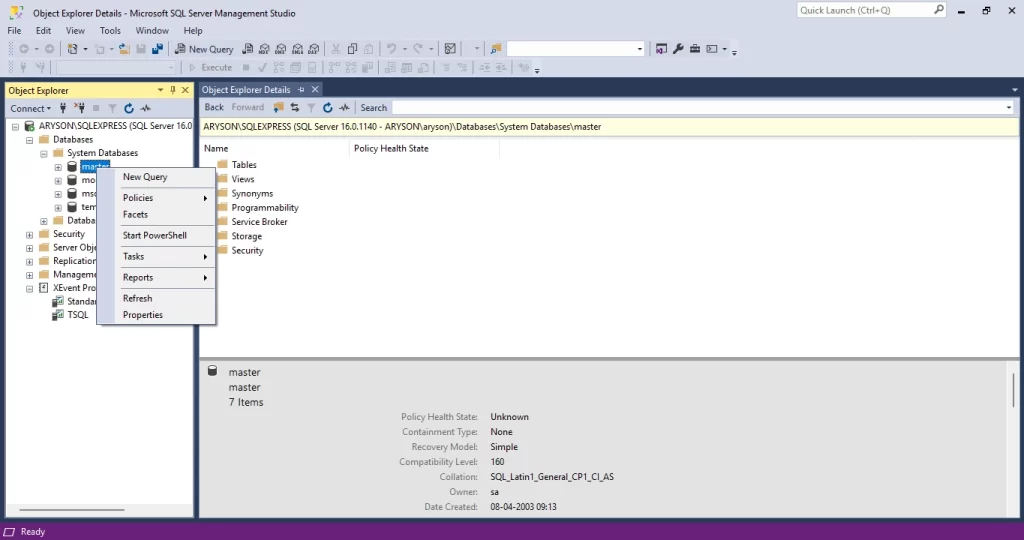
- After that, click on the Tasks menu, then choose Restore > Backup.
- Next, browse and select the location where your backup file is stored.
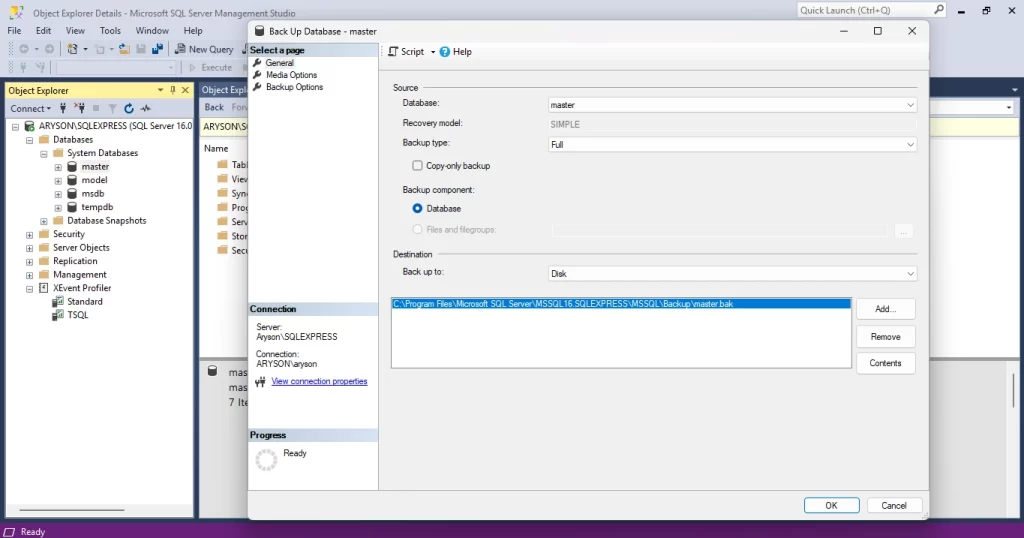
Note: The manual method partially restores your database. If you want complete restoration, use the professional tool method.
Professional Method to Restore Corrupt SQL Backup File Database
Restoration of the corrupted database becomes essential to database continuity. To restore the corrupted database without losing the single metadata, use a reliable SQL Database Recovery. These tools quickly repair and recover damaged database files without hassle. Moreover, they come with an easy interface for all user levels. Additionally, the tool preserves data integrity throughout the recovery process. The original database structure remains fully intact during repair. This guarantees no data loss and enables fast database restoration. Besides this, the software also helps you to restore SQL database from one server to another.
Simple Steps to Recover SQL Database from a Corrupt .BAK File
- Begin by downloading and launching the SQL Database Recovery Tool on your computer.
- After that, click on the Open option to locate and select the damaged MDF files.
- Next, browse your system to upload the files from local storage.
- Choose an appropriate recovery mode depending on the severity of the corruption.
- Once loaded, preview the contents of the corrupted MDF file.
- For SQL Server Authentication, input your login credentials and test the database connection.
Conclusion
Fixing a damaged SQL backup file is no longer daunting or techie. With an effective tool, it’s quick and easy. You don’t have to be an expert in SQL to fix your backup. A capable recovery tool does most of the work for you. It safeguards your data and saves time. You can even relocate the database between servers with ease. Restore corrupt SQL backup file database and don’t lose your data with trusted recovery.
Frequently Asked Questions
Q.1 How to repair a corrupted SQL file?
Ans. To recover or repair a corrupted SQL file, use a manual method or a professional tool. The tool repairs all your files with ease without altering the database.
Q.2 How do I uncorrupt a corrupt file?
Ans. You can uncorrupt your corrupted file by using different approaches in different situations. Choose the method that is needed as per the situation.
Q.3 What is the command to fix corrupt files?
Ans. For Windows systems, you can use the built-in System File Checker (SFC) and DISM tools and their commands to repair corrupt sql .bak file in SQL servers.
4.9 based on 1809 user reviewsAbout The Author:

Rohan Wiese is a content and website optimization expert who helps blogs and businesses grow organically. He specializes in enhancing content quality, improving site structure, and increasing online visibility through smart, practical, and easy-to-implement strategies that drive long-term results.
Related Post