-
Written By Isha Singh
-
Updated on May 18th, 2026
How to Convert OLM Files to EML on Mac and Windows Safely
 4.9 based on 1809 user reviews
In this guide, we will explain to you how to move your OLM files into EML format, which includes their attachments. Along with that, we will also explain the two reliable methods to accomplish the conversion process. The methods include a do-it-yourself approach and a professional OLM Converter Tool. But before we get into how to convert OLM files to EML, let’s talk about why users want to save Outlook OLM files to EML.
Common Reasons Behind OLM to EML Conversion
- This conversion becomes important when users switch from Mac to Windows OS.
- EML files can be easily opened in different email clients, such as Thunderbird.
- Moreover, it creates an individual email backup, which is useful for users sometimes.
- EML files are portable and can be shared individually.
Why Do Users Prefer to Convert OLM to EML?
There are a few reasons because of that users export OLM files to the EML file format:
- EML files work with more email programs than OLM files.
- Also, EML files are individual email files that are easier to share.
- Some browsers may open EML as text, but dedicated email clients work better.
Now, we need to learn about OLM and EML file formats, and then we will explore the methods.
| Features | OLM | EML |
| File Format | It’s Standard for Outlook for Mac | It’s a Standard file format used by many different email clients |
| Data Stored | It can store Emails, contacts, calendars, notes, and other data from Outlook | It can only store individual email messages |
| Compatible with | Outlook for Mac | Outlook, Thunderbird, Apple Mail, Gmail, and many other email clients |
| Use Cases | It used to store and back up Outlook for Mac data | It used to export and share individual email messages |
Now, let’s go through the step-by-step instructions for the smart methods.
Two Free Techniques to convert OLM Files to EML
We will discuss two effective solutions to export multiple OLM files to the EML file format using the manual or professional method.
- Manual Method (For Single Files)
- Professional Software (For Bulk Conversion)
Method 1: Manual Way to Convert OLM File into EML
- Open the Outlook application on your Mac.
- Select the email that you want to convert to EML format.
- Drag and drop the selected email to your desktop.
- This will create a new EML file for each email that you drag and drop.
Limitations of the Manual Method
- The process becomes very time-consuming for large mailboxes.
- With this method, you can convert single emails at a time.
- Moreover, an Outlook for Mac installation is required.
- Bulk conversion of OLM files is not possible when you export emails from OLM file to EML.
Method 02: Professional Software to convert OLM Files to EML
OLM Converter Tool is a simplified solution and offer a bulk conversion of emails. It is made to maintain the folder hierarchy. Moreover, this software can convert OLM to MSG, MBOX, and other file formats. If you want to convert your OLM files into a calendar, then you can convert OLM file to ICS as well. Its simple UI helps users to easily understand the software and perform the conversion process.
Simplified Process to Export OLM to EML Files
- To begin the conversion, download and launch the OLM Converter Tool.
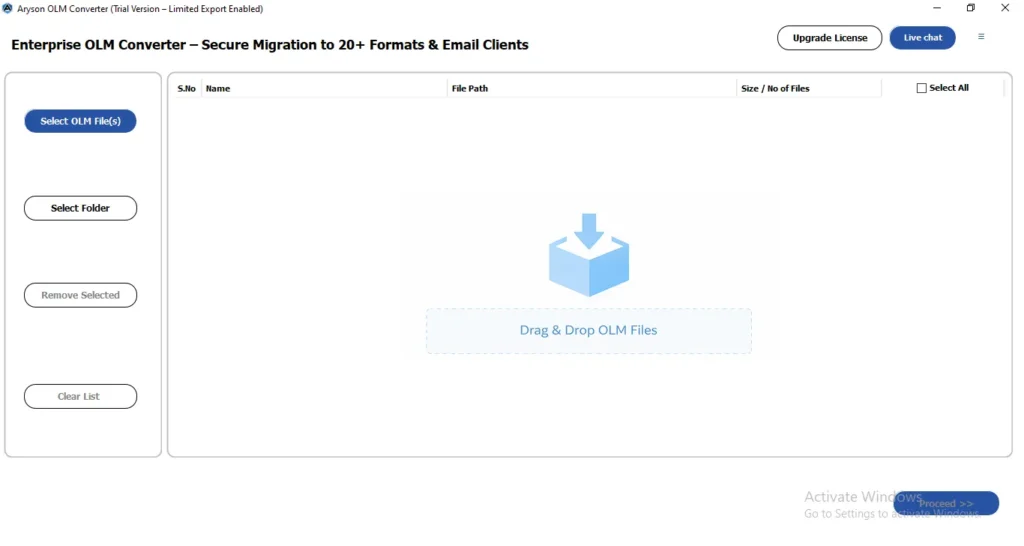
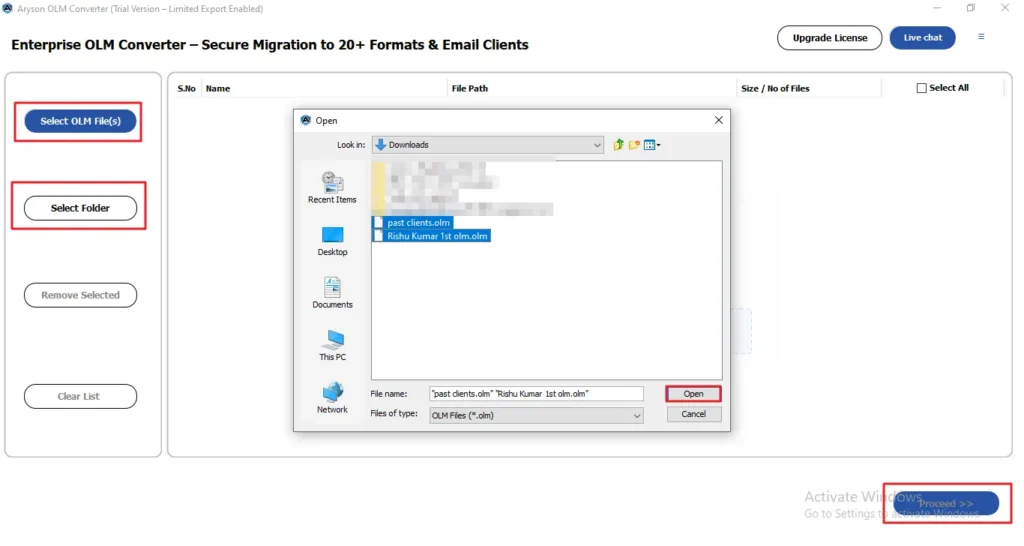
- Thereafter, select the file/folder and navigate the .olm files saved in your device >> open.
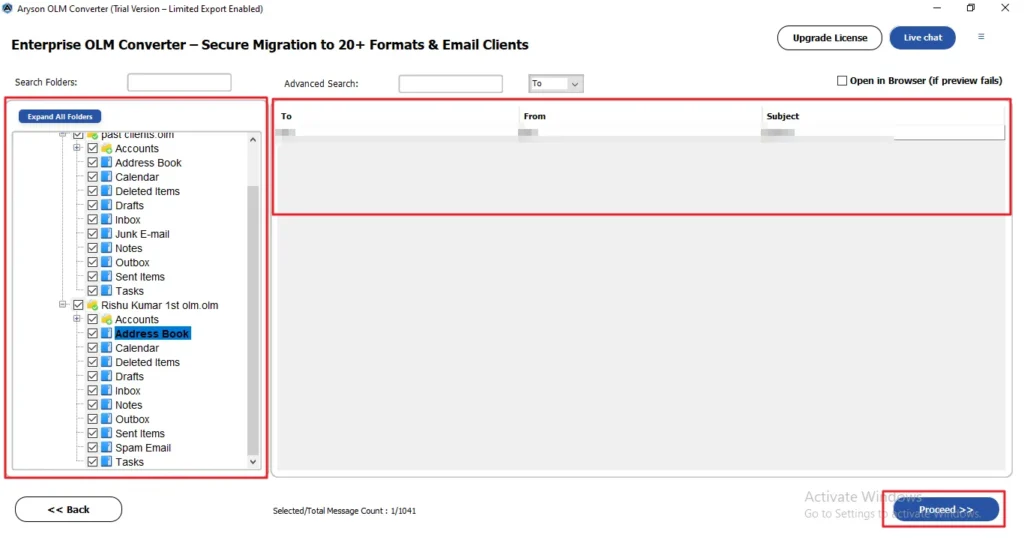
- Now, you can select the folders from a tree structure and click on proceed.
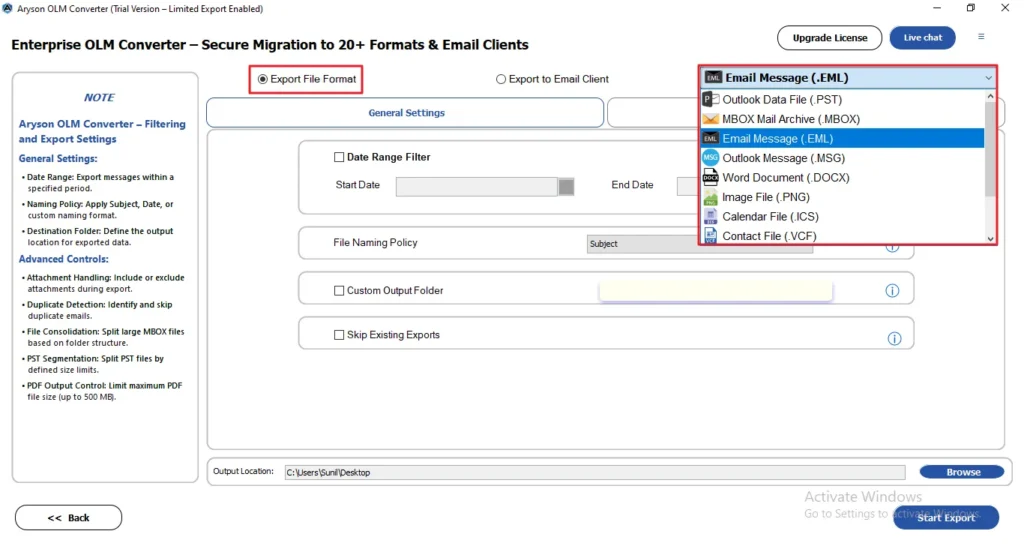
- Next, select EML from the given file formats as your output format.
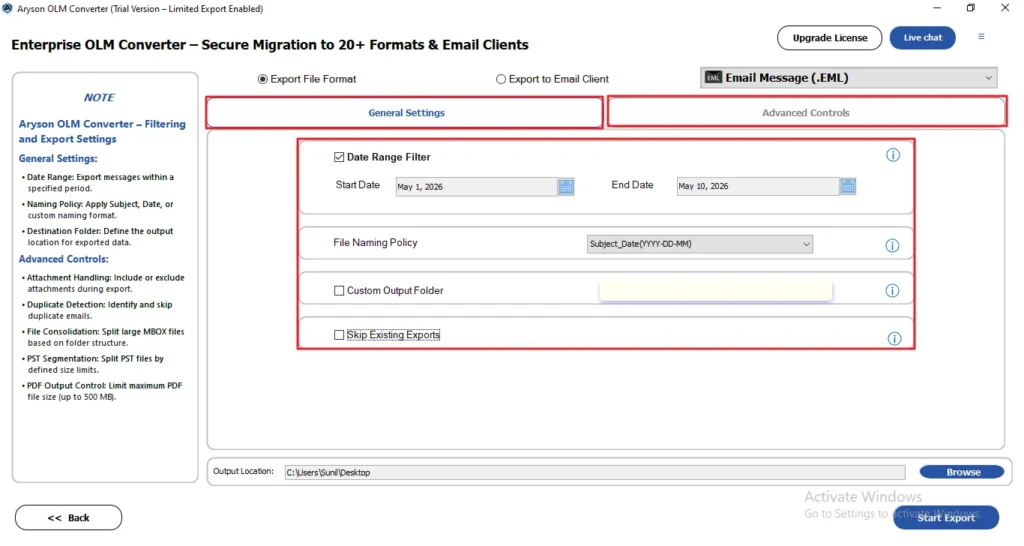
- After that, apply the filters for specific migration from the general and advanced settings.
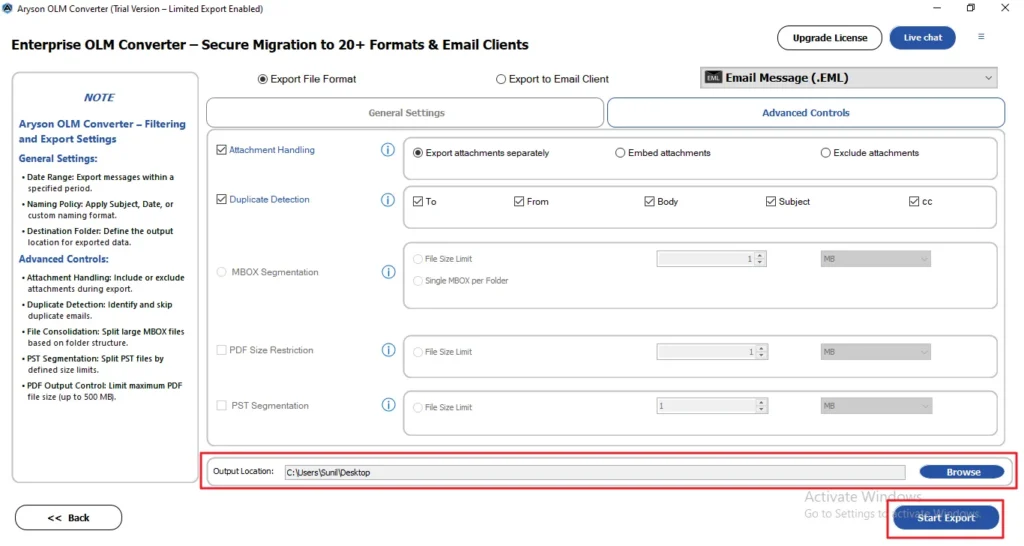
- In the end, browse the destination to save exported files and click Start Export.
Manual vs Professional Method Comparison
| Features | Manual Method | Professional Method |
| Bulk Conversion | Not Available | Available |
| Time Required | High | Minimum |
| Technical Knowledge | Required | Minimal |
| Maintain Folder Hierarchy | Limited | Yes |
| Cross-Platform Support | Limited | Available |
Conclusion
You have two options to convert OLM Files to EML: manual and professional methods. The manual way is slow and a bit tricky because it does one email at a time. Whereas the professional method is quicker, converting all your OLM files to EML in one go. Therefore, you can pick the one that suits your needs better to convert OLM files to EML.
Frequently Asked Questions
Q1: Can I open OLM files in Windows directly?
Ans. No, OLM files are not supported on Windows directly. You need to convert them into PST or another compatible format.
Q2: Which email clients support EML files?
Ans. EML files are supported by clients like Microsoft Outlook, Mozilla Thunderbird, Windows Mail, and Apple Mail.
Q3: Why is my OLM file not opening?
Ans. The OLM file may be corrupted, incomplete, unsupported, or opened in an incompatible application.
Q4: What happens if OLM conversion fails?
Ans. Failed conversion may result in missing emails, inaccessible data, or partially converted files.
Q5: Can corrupted OLM files be converted to EML?
Ans. Yes, some professional conversion tools can recover and convert corrupted OLM files to EML format.
4.9 based on 1809 user reviewsAbout The Author:

Isha Singh is a content and website optimization expert who helps blogs and businesses grow organically. She specializes in enhancing content quality, improving site structure, and increasing online visibility through smart, practical, and easy-to-implement strategies that drive long-term results.
Related Post