-
Written By Isha Singh
-
Updated on January 8th, 2026
How to Effortlessly Attach MDF and LDF Files in SQL Server
 4.9 based on 1809 user reviews
Overview: In 2026, users face an issue while attaching their MDF and LDF files in SQL Server. Attaching database files is a common task in SQL Server, especially during database migration, recovery, or server changes. Further, MDF and LDF files store critical database data and transaction logs, and attaching them correctly ensures database integrity and smooth access.
In this blog, we will explain step-by-step methods to attach MDF and LDF files in SQL Server. This article is made for both beginners and professionals looking for a reliable and hassle-free approach. Also, we will discuss how a professional DataRecoveryFreeware SQL Database Recovery Tool will help you to ease your work.
Understand the MDF and LDF Files
Here, we will discuss the MDF and LDF files in detail and the difference between both of them.
What is an MDF file?
This is the main data file that contains all the data, including the database schema and actual user data. Also, all databases have a primary server that serves as the starting and ending point.
What is an LDF file?
This is the transaction log file that keeps the record of every change in insert, update, delete, etc. Moreover, the LDF file is crucial for maintaining data integrity and essential for recovery.
Juxtaposition Between MDF and LDF Files
| Features | MDF | LDF |
|---|---|---|
| Full Name | Main Database File | Log Database File |
| Purpose | It stores actual data | Whereas it stores transaction logs |
| Used for | Database Store & Structure | Recovery and rollback |
| Re-creatable | No | Yes |
Next, proceed further with the methods discussed below to recover database from MDF and LDF file in SQL Server. Also, you can attach an SQL Server database without a log file.
Manual Method to Attach MDF File to SQL Server
Prerequisites: Before proceeding with the methods
- SQL Server is compatible with the database files.
- MDF and LDF files are stored in a secure local directory.
- The database was completely shut down (recommended).
- Check if the SQL Server has read and write permissions.
Solution 01: Steps to Attach SQL Server Database Without Log File
- Firstly, open the SQL Server Management Studio on your system.
- Now, connect with your SQL Server instance and right-click on the database.
- Further, click on the ‘Attach’ and ‘Add’ buttons and choose the MDF file.
- Afterward, the SQL Server will automatically detect your LDF file, and you can click OK to attach it to the database.
Solution 02: Attach MDF File Using T-SQL
Steps to Attach MDF and LDF Files Using T-SQL
- To initiate the process, start SQL Server services and confirm the target instance is online.
- Copy both files to a folder (e.g., `C:\Data\`) and grant Read/Write permissions to the SQL Server service account.
- Now, launch SSMS and connect to the required SQL Server instance.
- And click on the New Query and select the master database.
- Next, run the attach command:
- Further, check that MyDatabase appears under Databases and its status is Online.
- At last, run a simple query to confirm your data accessibility:
| CREATE DATABASE MyDatabase ON (FILENAME = ‘C:\Data\MyDatabase.mdf’), (FILENAME = ‘C:\Data\MyDatabase.ldf’) FOR ATTACHMENT; |
| SELECT TOP 10 * FROM sys.tables; |
Common Errors While Attaching the MDF file
- Likewise, the database is not completely shut down.
- Permission denied, or log file missing or corrupted.
- Moreover, the database is marked as suspect.
Best Practice to Attach MDF File to SQL Server
- It is recommended to always back up before attaching.
- Additionally, avoid attaching the production database without the LDF file.
- If possible, use the same SQL server.
- Further, it maintains the file permissions.
Professional Solution to Load MDF and LDF Files in SQL Server
To overcome the above limitations and want a secure solution, use DataRecoveryFreeware SQL Database Recovery Software. In addition, the powerful and reliable solution recovers corrupted or inaccessible SQL Server databases with complete accuracy. Additionally, it helps users restore data from damaged MDF and LDF files, even when the log file is missing, to attach MDF and LDF files in SQL Server.
This software efficiently recovers tables, views, triggers, indexes, stored procedures, keys, and constraints while maintaining original data integrity. Next, with its advanced scanning and preview feature, users can verify recoverable database objects before exporting them.
Step-by-step process to Attach MDF File to SQL Server
- To start the process, download and install the SQL Database Recovery Tool.

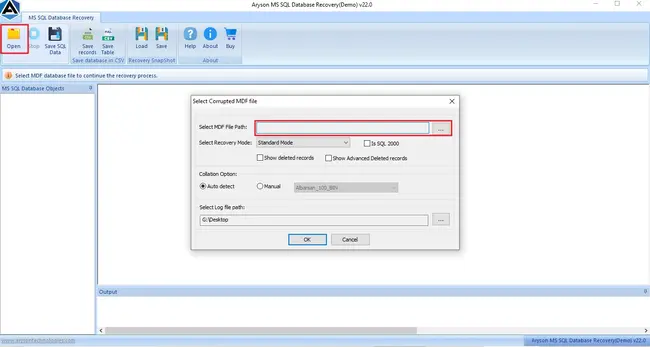
- Now, click on the Open button from the menu bar and browse the .mdf file location.
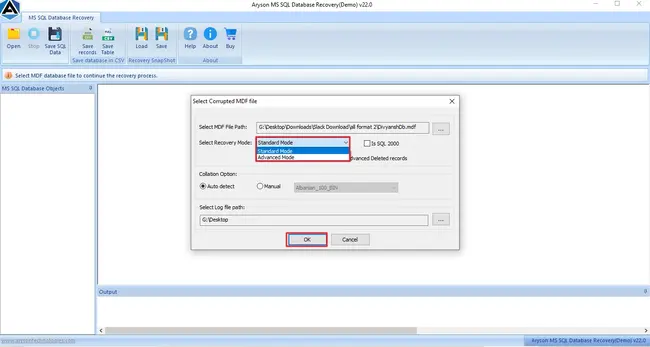
- Further, you have to select the mode for the recovery: Standard or Advanced, and click OK.
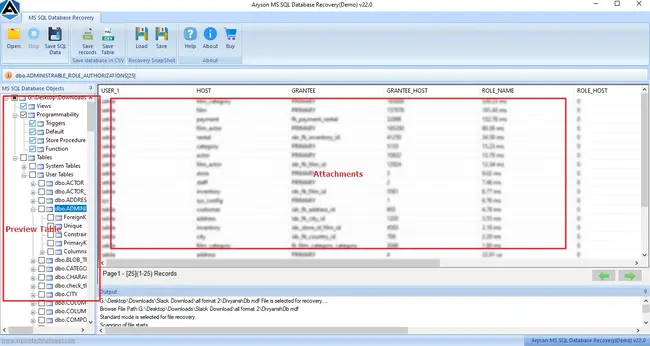
- After that, the preview panel opens, from where you can select the file to view attachments.
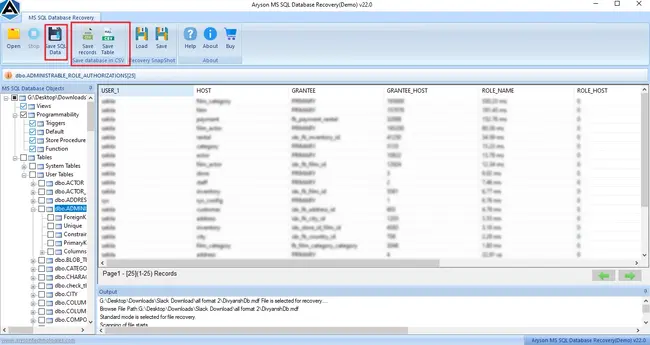
- Lastly, from the top menu bar, select ‘Save SQL Data‘ to save the files.
Also Read: Open MDF Files
Writer’s Recommendation
To finish it, we discussed the methods by which you can attach MDF and LDF files to the server. Also, it’s up to you to choose the feasible method that is suitable based on your data. Additionally, for your ease, you can use the professional tool and attach MDF and LDF files in SQL Server.
Frequently Asked Questions
1. Can I recover an SQL Server database from just the MDF file?
Ans. Yes, SQL Database Recovery Tool can recover the database using only the MDF file, even if the LDF file is missing or damaged.
2. Is it safe to attach MDF and LDF files from another SQL Server instance?
Ans. It can cause issues due to version or permission conflicts, but DataRecoveryFreeware safely recovers and exports data to a compatible SQL Server without risk.
3. How do I fix permission errors when attaching MDF files?
Ans. The SQL Database Recovery Tool bypasses permission issues by opening MDF files directly, so no manual permission changes are required.
4. What versions of SQL Server are supported?
Ans. The DatarecoveryFreeware SQL Database Recovery Tool supports all major SQL Server versions, from older editions to the latest releases.
5. How can I check if my database is working properly?
Ans. Yes, the SQL Database Recovery Software lets you preview all database objects before recovery, ensuring everything is intact and functional.
4.9 based on 1809 user reviewsAbout The Author:

Isha Singh is a content and website optimization expert who helps blogs and businesses grow organically. She specializes in enhancing content quality, improving site structure, and increasing online visibility through smart, practical, and easy-to-implement strategies that drive long-term results.
Related Post