-
Written By Rohan Wiese
-
Updated on February 4th, 2026
How to Fix SQL Server Error 3417: Windows Could Not Start SQL Server
 4.9 based on 1809 user reviews
SQL Server Error 3417 occurs when the Windows service fails to start SQL Server. It is because the system database files (especially the master database) are missing, corrupted, or inaccessible. However, this error usually appears after a system shutdown or improper system change and prevents SQL Server to run normally.
It is important to understand the cause of error 3417 because the SQL server cannot function without database access. In this guide, we will provide several approaches to address the SQL error solution, including the SQL Recovery Tool. These approaches will help you to resolve the error Code 3417, that ensure smooth and safe recovery of your data.
What is SQL Server Error 3417?
SQL Server Error Code 3417 is an error that happens when the SQL Server service can’t start. It happens because it can’t properly set up the system databases. These system databases, such as master, model, msdb, and tempdb, are important for SQL Server to work. If SQL Server can’t access or open these databases during startup, the service won’t start at all.
The error message you might see is: “Windows Could Not Start SQL Server on Local Computer Error 3417.”
Why does SQL Server Error Code 3417 occur?
There are many reasons due to which this error arises, including:
- When the master database is corrupted.
- It arises when the database files are missing or damaged.
- When the insufficient permissions are enabled on your system.
- The file path is incorrect for the SQL server database files.
- When the system shuts down suddenly or powercut.
Methods to Resolve Error 3417 SQL Server
Now, we will discuss the method to resolve the error. Fisrt analyse the error that causes the issue and after that peform the reliable method.
Method 01: Check your SQL Server Log
Before you make any change, review the server log to identify the issue.
- To start, open the SQL Server Configuration Manager.
- After that, go to the SQL Server Log File Location.
- Now, open the latest ERRORLOG file and look for messages related to: Missing files, Access denied, and Corrupted master database.
- This information will guide your next step.
Method 02: Verify Database System File Path
The incorrect file path can also prevent the server from starting.
- For this, open the SQL Server Configuration Manager.
- Then, double-click on the SQL Server service and click on Properties.
- After that, check the Startup Parameters and verify paths for -d (master.mdf), -l (mastlog.ldf), and -e (error log).
- At the end, make sure all referenced files exist at the specified location.
Method 03: Verify SQL Server Folder Permission
Before you start with this process, SQL Server requires full access to its data directories.
- Initially, go to the SQL Server data folder (usually C:\Program Files\Microsoft SQL Server\).
- Then, double-click on the folder, then Properties, and after that navigate to Security.
- Now, you have to make sure the SQL Server service account has Full Control, Read & Write permissions.
- After that, restart the SQL Server service after you update the permissions.
Method 04: Launch the SQL Server in Minimal Mode
Basically, when you start the SQL Server in a minimal configuration can help bypass startup issues.
- First, open the Command Prompt as Administrator on your system.
- After that, navigate to the SQL Server Binn directory.
| Run SQL Query: sqlservr.exe -f |
After these steps, if SQL Server starts successfully, configuration or database corruption is likely the issue.
Method 05: Rebuild System Database in SQL Server
If the master database is corrupted, rebuilding it is often the most effective solution.
- To initiate, insert the SQL Server installation media and open Command Prompt as Administrator.
- After that, provide a strong system administrator password for security.
- Finally, restart the SQL Server after completion.
| Run SQL Query: setup.exe /ACTION=RebuildDatabase /INSTANCENAME=MSSQLSERVER |
Method 06: Professional Software to Repair MS SQL Server Error 3417
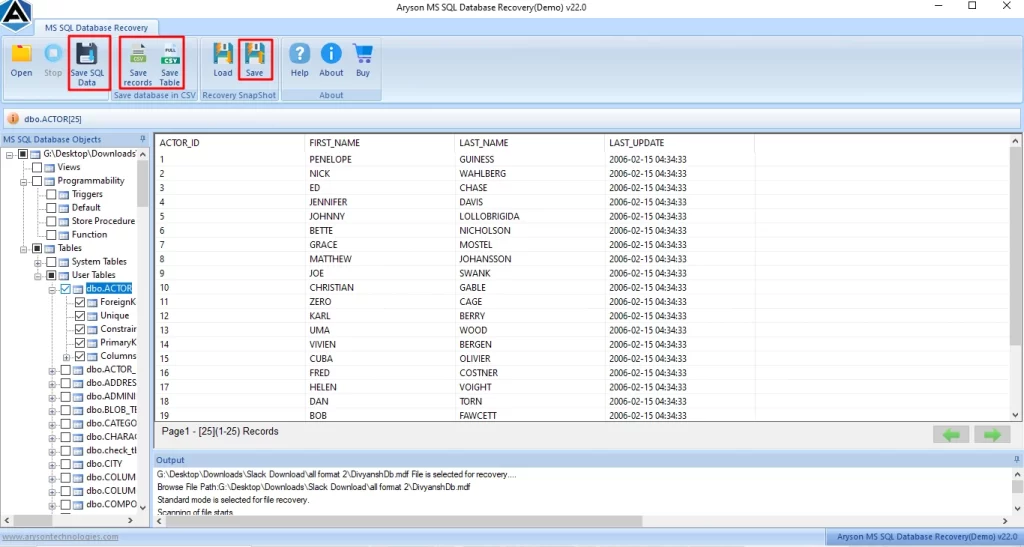
Basically, if you are not able to repair your corrupt files, use the professional SQL Recovery Tool. Also, it is a reliable software for all types of repair, including backup and restore database in SQL Server. However, this software helps users to repair all types of major and minor errors. Its advanced scanning option helps to analyse and repair all the corrupt and damaged files. To know how this software works to resolve the error, follow the steps:
Working Process for Error 3417 SQL Server
- First, download and install the SQL Recovery Software on your system.
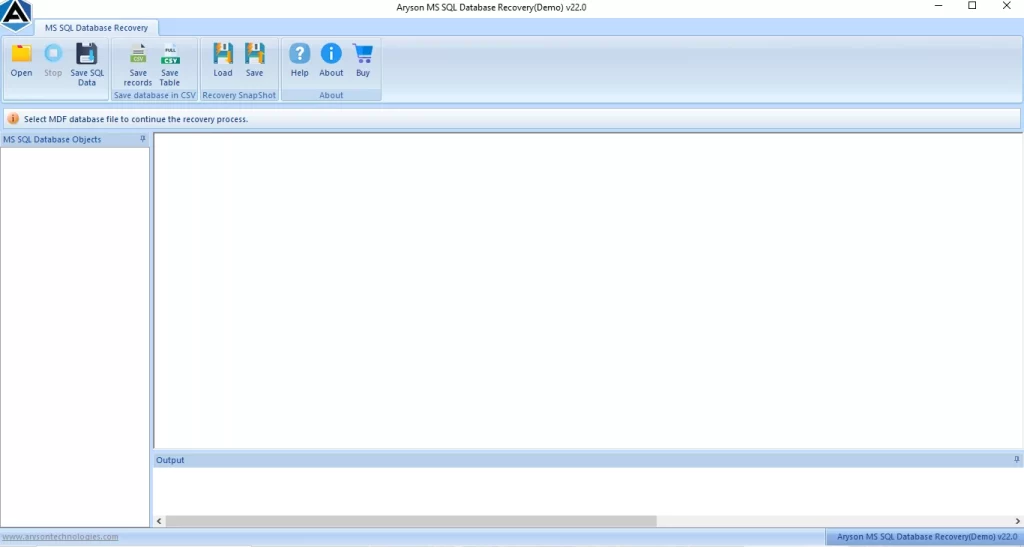
- After that, from the menu bar, click on Open and browse the .mdf files.
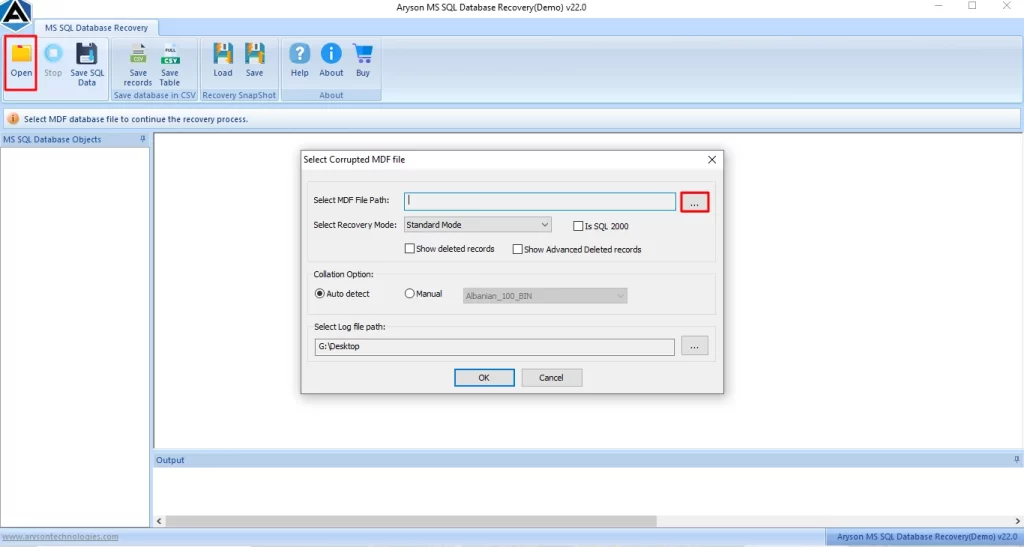
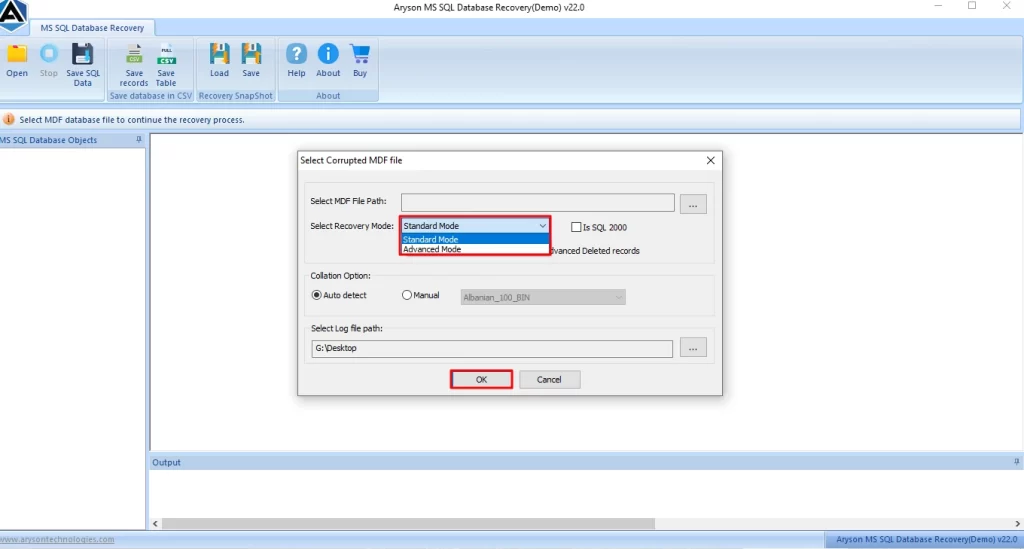
- Then, select the Standard and Advanced recovery modes to recover files, >> Ok.
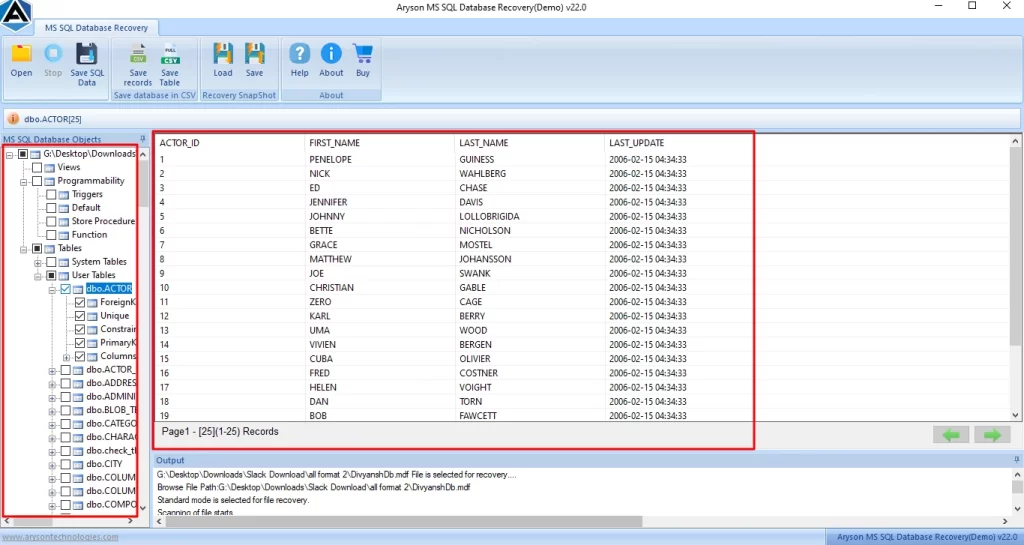
- Now, you can preview the scanned folders, and after clicking on any folder, you can view the attachments in tabular form.
- At last, click on Save from that to save your recovery files.
Benefits of Using the Automated Software
- Its scanning option helps users to scan their corrupt .mdf files.
- In addition, it preserves the user’s data folder structure and manages the folder hierarchy.
- Moreover, it provides a preview of your files before saving them.
- Furthermore, it securely recovers users’ tables, indexes, views, and triggers.
Precautions for SQL Server Error 3417 for Future
- It is important to always take a regular backup of the system database.
- Make sure to avoid the sudden system shutdown while you use SQL Server.
- Also, keep the SQL server updated with the latest version.
- Remember, your system should have free disk space.
In Closing
In the above blog, we covered all the reasons and fixes to resolve the SQL Server Error 3417. It is important to understand the triggers behind this error and resolve it using the right approach. By checking the error log, verifying the path, and fixing the permission can restore the server functionality. For secure and corrupt files errors, use a professional automated software that will speed up the repair process and keep data safe.
Frequently Asked Questions
1: Why does SQL Server fail to start with Error 3417?
Ans. It fails because the master database is corrupted or inaccessible, often due to system crashes or disk issues.
2: How can I fix SQL Server Error 3417 on my computer?
Ans. Yes, you can fix the error by following the correct method or by using the Data Recovery Freeware SQL repair tool.
3: Is SQL Server Error 3417 dangerous for my data?
Ans. Yes, it can risk data loss, but an SQL recovery tool can safely recover your data.
4: How do I prevent SQL Server Error 3417 in the future?
Ans. Take regular backups, avoid sudden shutdowns, and monitor disk health.
5: What are the common causes of SQL Server Error 3417?
Ans. Database corruption, power failure, disk errors, malware, or missing database files.
4.9 based on 1809 user reviewsAbout The Author:

Rohan Wiese is a content and website optimization expert who helps blogs and businesses grow organically. He specializes in enhancing content quality, improving site structure, and increasing online visibility through smart, practical, and easy-to-implement strategies that drive long-term results.
Related Post