-
Written By Rohan Wiese
-
Updated on February 28th, 2026
How to Recover Data From Hard Drive That Is Not Accessible
 4.9 based on 1809 user reviews
User Query: 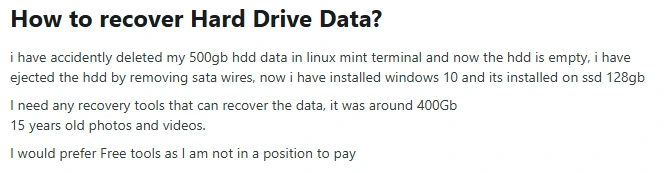
Summary: If you have accidentally deleted your valuable data. Don’t worry, you can still recover your valuable data, especially if the drive has not been overwritten. In this guide, we will discuss the most appropriate methods, including Hard Drive Data Recovery Software, for recovering data from a hard drive.
Reasons Why Your Hard Drive Is Not Accessible
Before we proceed further, it is important to understand the cause. Here are some common reasons:
- When a file appears as RAW in disk management, Windows cannot read the file system.
- The partition table may be corrupted or accidentally deleted.
- Probably, the physical areas of the disk have become unreadable.
- Apart from that, the security settings may stop access to the folder.
- Additionally, an improper shutdown and malware can cause it to not be accessible.
Important Note: If the hard drive is making clicking or grinding noises, power it off immediately. Continuing may cause permanent damage.
How to Recover Files from Hard Drive
Now, we will discuss some of the potential recovery methods to recover essential hard drive data. Make sure to perform the steps carefully to avoid mistakes during the recovery.
Method 01: Check Basic Hardware Issues
- Check the USB port or cable.
- Connect the drive to another PC.
- Check BIOS detection.
- Use a SATA-to-USB adapter.
Method 02: Check Disk Management
- To initiate the process, first press Windows + X.
- After that, click on Disk Management and look at the drive status.
- Raw means the file system is corrupted.
- Unallocated means the file partition has been deleted or lost.
- Healthy but inaccessible may indicate permission or security restrictions.
Important Note: Retrieve data from hard drive becomes difficult if you perform formatting on the hard drive.
Method 03: Fix Logical Error
If the drive is NTFS and detected, then open the command prompt and run as an administrator:
| chkdsk X: /f /r |
(Replace X with your drive letter.)
Note: If you face a minor issue, then use the CHKDSK command. On the other hand, when you feel there is major corruption, then stop using the drive.
Method 04: Use Professional Software to Recover Data from External Hard Drive
If you have a corrupt file, then it’s best to use the Hard Drive Data Recovery Software. This software is made to recover both minorly and majorly corrupted files. It provides an advanced scanning option to recover data. Also, you can preview the recovered files along with their attachments. Along with that, this software recovers files from HDD, SSD, or memory cards. Now, follow the method to perform the recovery of hard drive data.
Steps to Recover Data From Failed Hard Drive
- First, launch the Hard Drive Data Recovery Software on your system.
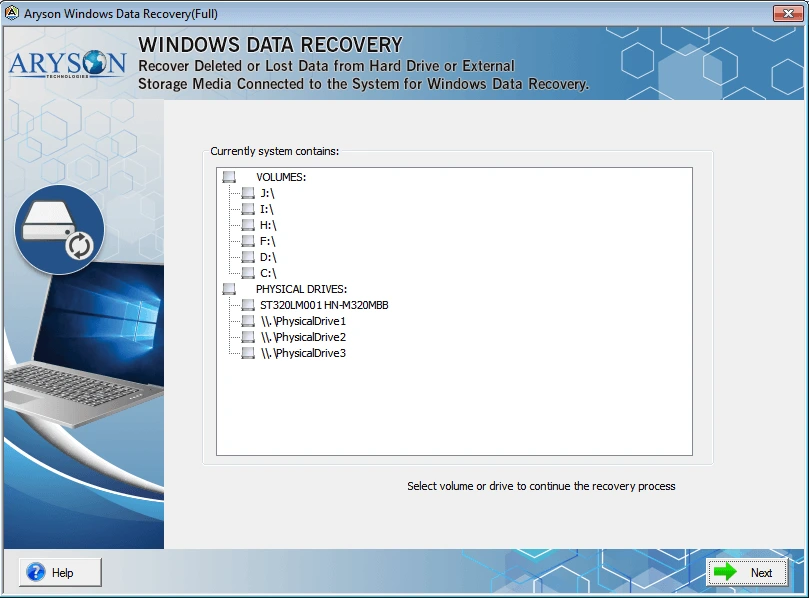
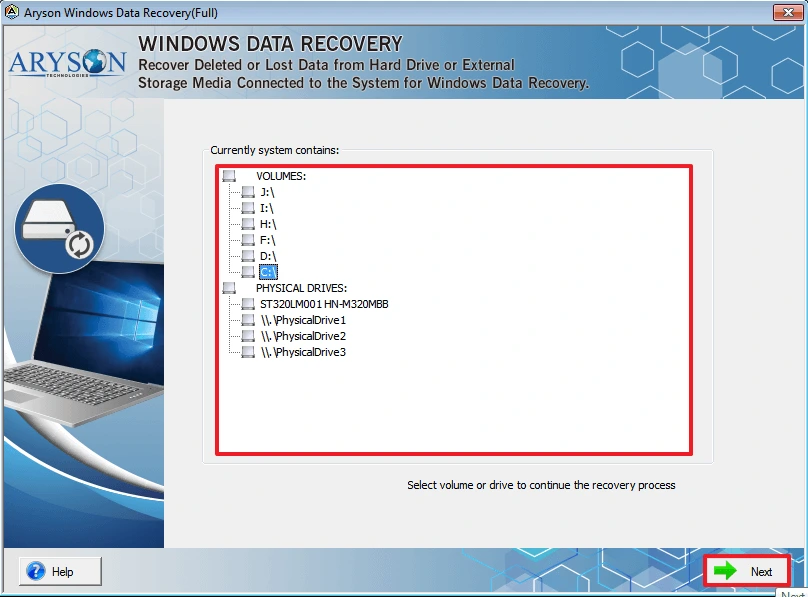
- After that, select the volume or physical drive and click on Next to proceed.
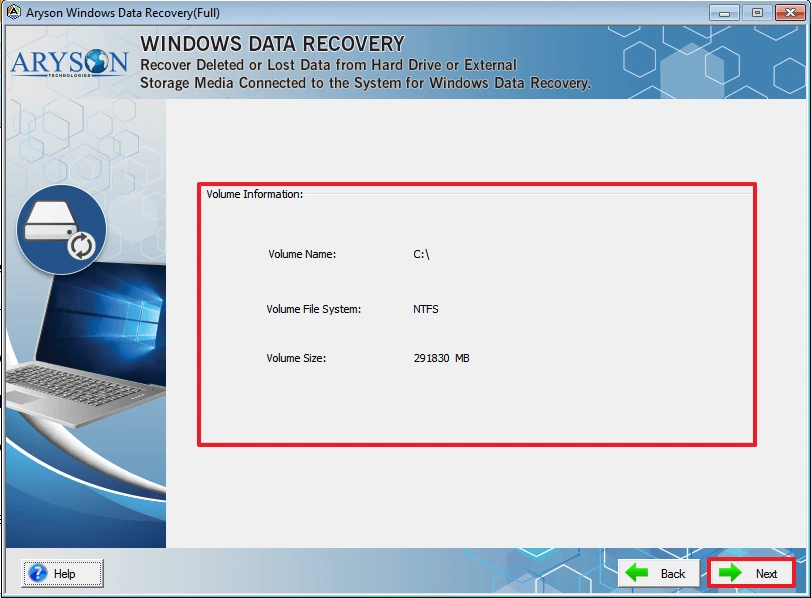
- On the next page, volume information is displayed >> click on Next to proceed.
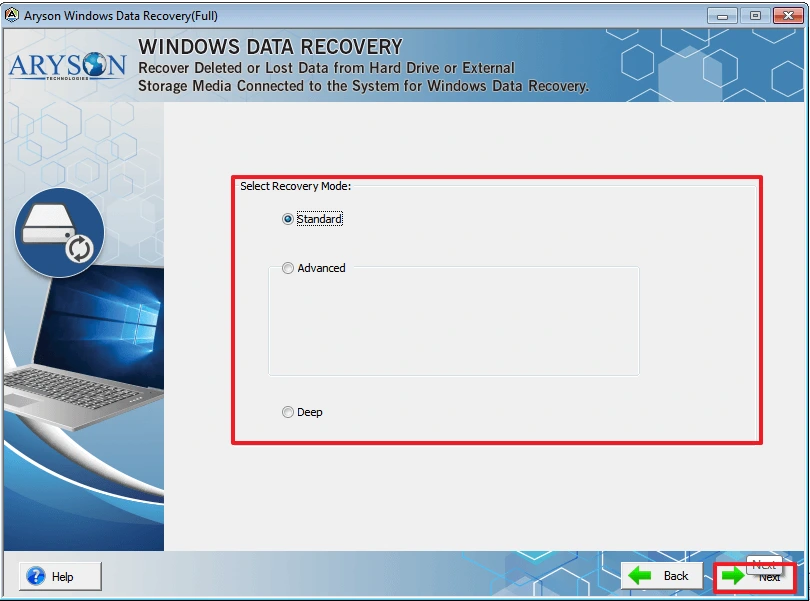
- Then, select the recovery mode and tap on Next to proceed further.
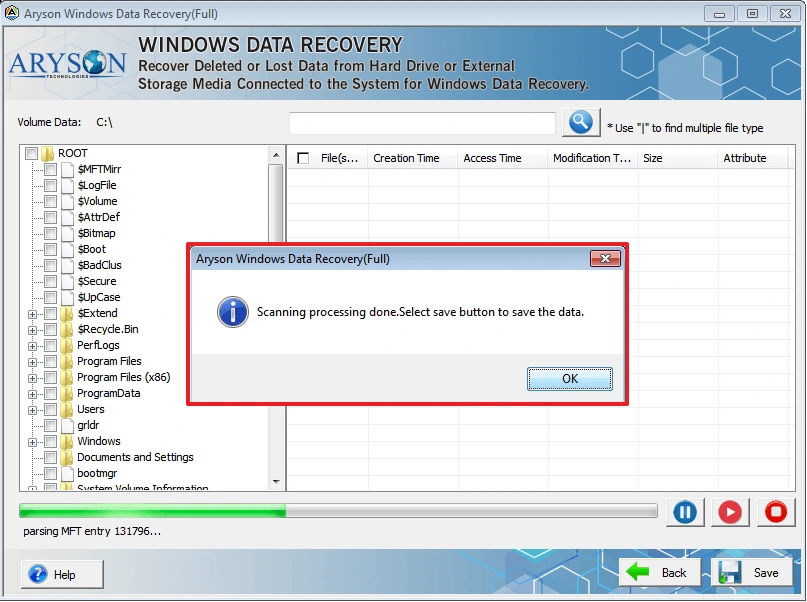
- After completion, preview the recovered files from the tree structure.
- Lastly, select the path to save the resultant file and click Save</b to complete the process.
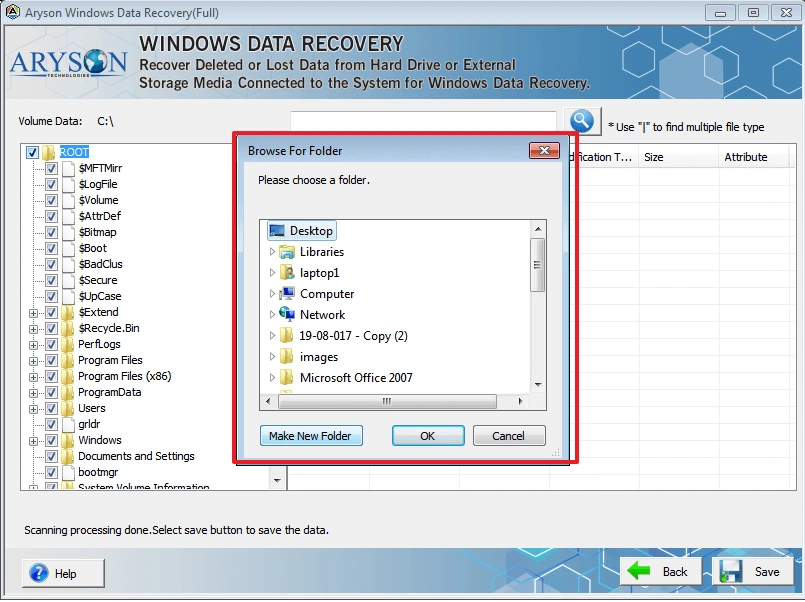
Note: It is suggested to always save the data to a different storage device to prevent overwriting.
Advanced Utility of this Software
|
Bulk Migration Manual Problem: Recovering 500 GB is slightly difficult; it may take several days. Solution: Therefore, use the Hard Drive Data Recovery Tool, which will recover data in bulk. |
Advanced Preview Option Manual Problem: No preview option is available for this method. Solution: Subsequently, you can preview the recovered files. |
|
Maintain Attachments Manual Problem: Does not provide an option to save the file to the required destination. Solution: In addition, you can save the resultant files in your preferred locations. |
Corrupt Issues Manual Problem: Not suitable for heavily corrupted files. Solution: Moreover, it is suitable for major and minor corruption of files. |
Important Safety Guidelines
- Stop using the drive immediately after the data loss.
- Make sure not to install the recovery software on the affected drive.
- If physical damage is suspected, consult the recovery services.
Final Quote
To wrap up, an inaccessible hard drive does not always mean a permanent loss. Whether your issue is a RAW partition or an access denied error, recovery is possible if you act quickly and carefully. You can use any method to recover data from hard drive with ease. Therefore, it is recommended to follow professional software that will safely recover your data without any loss.
Frequently Asked Questions
1. Why is my hard drive not accessible but still detected?
Ans. This usually happens due to file system corruption, bad sectors, or permission issues. The system detects the hardware, but the data structure is damaged.
2. Can data be recovered from a hard drive showing “Access Denied”?
Ans. Yes. You can recover files using Hard Drive Data Recovery software or by adjusting folder permissions.
3. Can I recover files from a hard drive without formatting it?
Ans. Yes. You should avoid formatting before recovery. Hard drive data recovery tools can retrieve data without formatting the drive.
4. Is it possible to recover data from a failed hard drive?
Ans. If the failure is logical, recovery is often possible. If it is physical damage, professional recovery services may be required.
5. How do I retrieve data from an external hard drive that won’t open?
Ans. First, check cables and ports. Then use Disk Management to inspect the drive. If it shows errors, use recovery software to scan and extract files.
6. What causes a hard drive to become inaccessible?
Ans. Common causes include corruption, malware, bad sectors, improper removal, partition damage, and hardware failure.
4.9 based on 1809 user reviewsAbout The Author:

Rohan Wiese is a content and website optimization expert who helps blogs and businesses grow organically. He specializes in enhancing content quality, improving site structure, and increasing online visibility through smart, practical, and easy-to-implement strategies that drive long-term results.
Related Post