-
Written By Isha Singh
-
Updated on February 12th, 2026
How to Effortlessly Import MSG to Yahoo Mail
 4.9 based on 1809 user reviews
Since MSG files are single email messages saved from Microsoft Outlook. The problem is that Yahoo Mail doesn’t open MSG files, so you can’t just upload them. If you’re trying to move your MSG emails into Yahoo, you’ll need a proper workaround. In this blog, we’ll explore some simple ways to import MSG to Yahoo Mail without making it complicated. And if you want something quicker and more reliable, you can also use an MSG Converter tool to keep your email formatting and data safe.
Why You Should Import MSG Files to Yahoo Mail
Here are some useful reasons to understand the importance of MSG files to Yahoo Mail:
- MSG files normally open only in Outlook, which can be limiting.
- Importing MSG data to Yahoo Mail lets you access it from anywhere.
- Yahoo Mail keeps all your email in one place for easy accessibility.
- It is easier to search emails and organize old messages in Yahoo Mail.
- Moreover, when you save emails in Yahoo Mail, you don’t need Outlook.
- It works as a backup when you switch from Outlook to the Cloud platform.
Top 2 Methods to Import MSG to Yahoo Mail
Follow the most appropriate solutions that easily import your MSG files into MBOX.
- Conventional Approach
- Reliable Utility
Solution 01: Conventional Approach to Transfer MSG files to Yahoo Mail
Yahoo Mail does not support a direct conversion of MSG files. Therefore, you have to first import MSG files to reliable EML formats, then upload them to Yahoo Mail. To begin with, follow the steps below:
Step 01: Use Outlook to convert MSG to MBOX
- Initially, you must open MS Outlook on your system & navigate to the MSG files.
- After that, drag and drop the MSG files into the Outlook (inbox).
- Now, open the email and click on the File >> Save As.
- Next, select the Text or HTML format and save it.
- Choose the “Outlook Message Format – Unicode” or drag the email to your desktop to save it as EML (if supported).
Note: However, Outlook does not directly provide a proper MSG to EML conversion option in all versions. You may need an additional email client to complete the process. In some cases, formatting and attachments may not always remain fully intact.
Step 02: Upload Emails to Yahoo Mail via Thunderbird
- First, you have to install Mozilla Thunderbird on your system.
- Then, add a Yahoo Mail account (imap.mail.yahoo.com, Port 993, SSL enabled).
- After that, you have to import the converted EML files into Thunderbird.
- Next, move the emails to your Yahoo Mail folder and wait for synchronization to complete.
Limitations of this method:
- Manual conversion may cause formatting or attachment issues.
- Furthermore, it may take a lot of time for the bulk conversion of files.
- Moreover, users must have Outlook installed on their system.
- It requires technical steps and multiple applications to complete the process.
Therefore, the above limitations restrict you from importing your MSG data. Now, follow the reliable solution that will import data with complete data integrity.
Solution 02: Reliable Utility To Import MSG to Yahoo Mail
The MSG Converter Tool provides a direct way to import your data. This software makes sure a smooth conversion, along with attachments and folder hierarchy. Moreover, you can preview your mailbox folders before you start the process. Its advanced features, like remove duplicate emails, skip previous migration, and date filters, let you import selective data. This software allows users to migrate data to various cloud-based platforms.
Additionally, this method is more suitable for bulk MSG file conversion through the MSG to Yahoo Converter Tool. Now, follow the steps to move your valuable data carefully.
Quick Way to Move MSG Files to Yahoo Mail
- Start with download the MSG Converter Tool on your system.
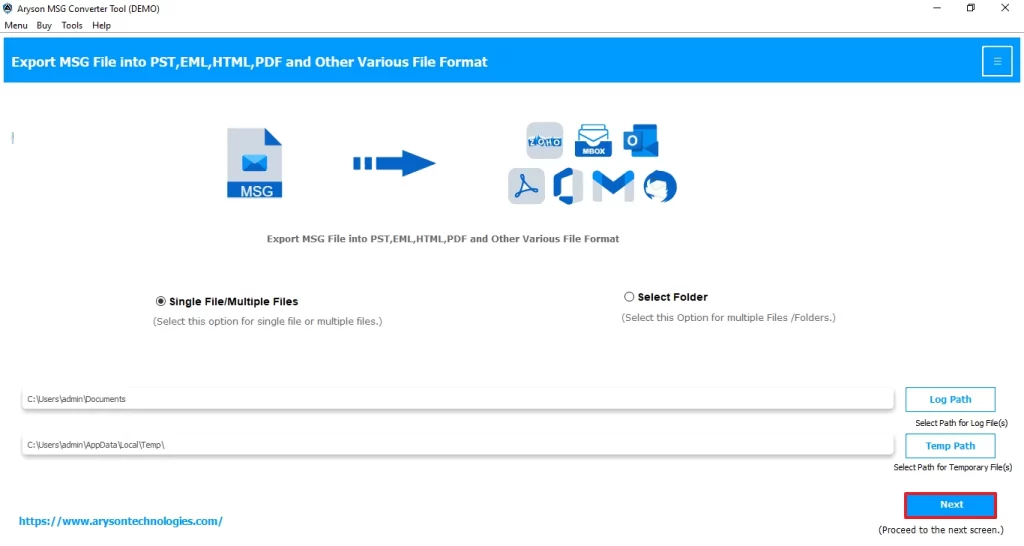
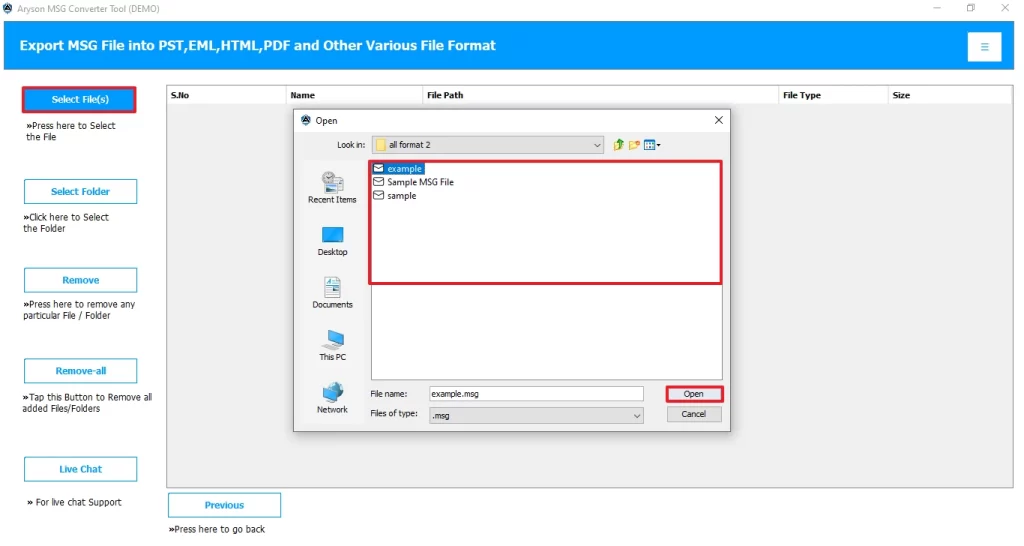
- After that, choose the file/folder you want to import and proceed further.
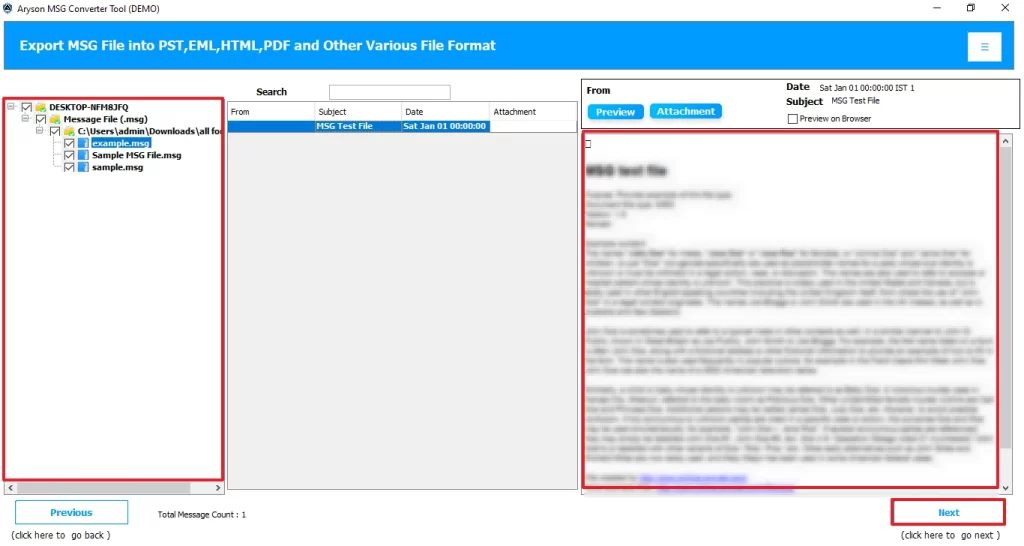
- Now, you can preview the files in a tree structure along with attachments >> Next.
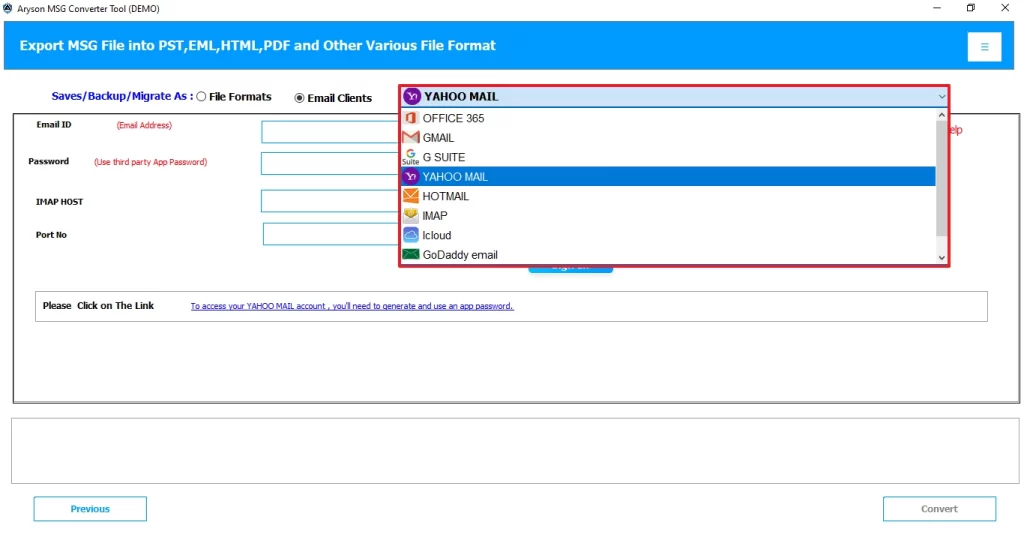
- Next, from the drop-down menu, select Yahoo Mail as an output source.
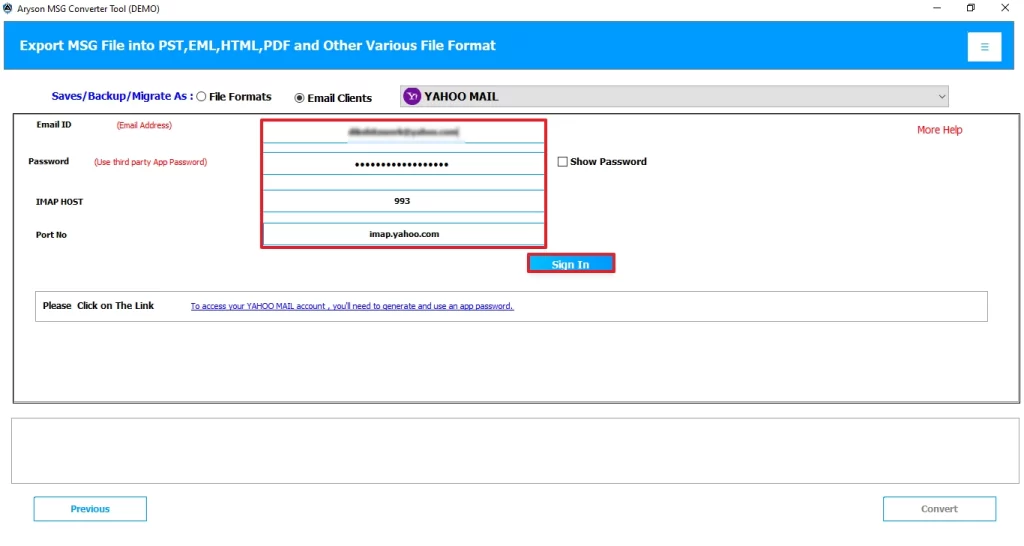
- Enter the Yahoo Mail login credentials, including Host – imap.yahoo.com and Port – 993.
- At last, apply the filters for selective migration and click on Convert.
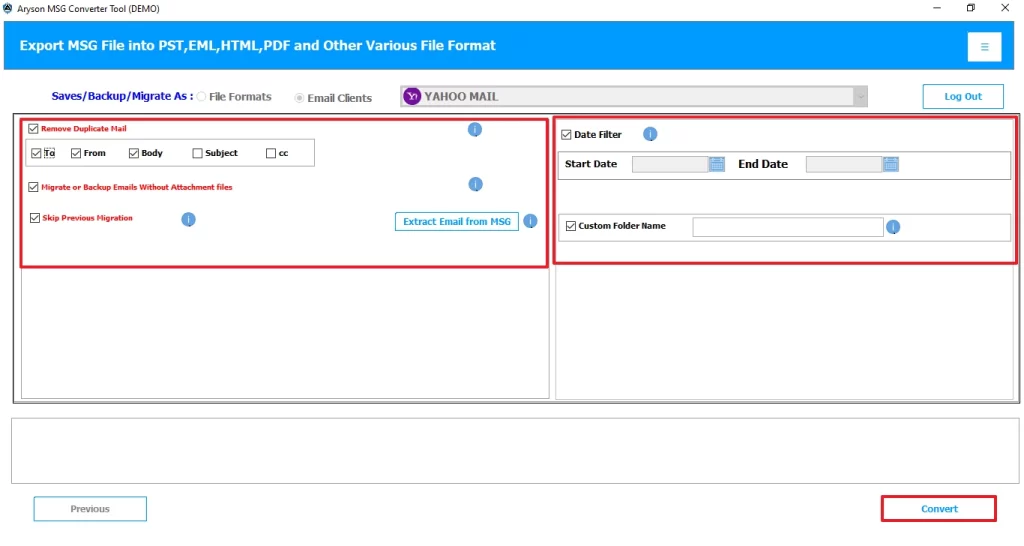
Valuable Features of this Software
- It provides several file formats to convert MSG data, such as PST, MBOX, EML, etc.
- Let users assign a custom folder name for better recognition.
- This software lets users eliminate the repetition of files by removing duplicate emails.
- Also, you can import MSG to Gmail and other email clients.
- Moreover, you can get selective date data by applying the date filter option.
- Furthermore, this software supports batch conversion of multiple MSG files at once.
Conclusion
In this blog, we explored various reasons why users prefer to import MSG to Yahoo Mail. Both approaches are reliable based on the need for your file sizes. It is important to opt for the most appropriate method for an efficient migration. The conventional approach is suitable for a small amount of data. On the other hand, it is recommended to use the advanced software to import a large amount of essential data.
Frequently Asked Questions
Q 1: Is it possible to import multiple MSG files to Yahoo Mail at once?
Ans. Yes, MSG Converter supports batch conversion, allowing you to import multiple MSG files to Yahoo Mail in a single process without any hassle.
Q 2: Do I need to convert MSG files before uploading to Yahoo Mail?
Ans. No, this MSG Converter tool automatically handles the required conversion and directly migrates MSG files to Yahoo Mail without needing any manual conversion steps.
Q 3: How long does it take to import MSG files to Yahoo Mail?
Ans. Usually, the time depends on the size and number of MSG files. However, this software ensures a fast and secure migration process while maintaining data integrity.
Q 4: Can I preserve attachments when importing MSG emails to Yahoo Mail?
Ans. Yes, this MSG Converter tool keeps all email components intact, including attachments, formatting, and folder structure.
Q 5: Which formats does Yahoo Mail support for importing emails?
Ans. Generally, MSG Converter eliminates compatibility concerns by converting MSG files into a suitable format and directly migrating them to Yahoo Mail.
4.9 based on 1809 user reviewsAbout The Author:

Isha Singh is a content and website optimization expert who helps blogs and businesses grow organically. She specializes in enhancing content quality, improving site structure, and increasing online visibility through smart, practical, and easy-to-implement strategies that drive long-term results.
Related Post