-
Written By Isha Singh
-
Updated on March 26th, 2026
How to Clear SQL Server Transaction Log Using DBCC SHRINKFILE
 4.9 based on 1809 user reviews
The process to manage the transaction log in SQL Server is critical to maintain database performance and prevent storage issues. Over time, the transaction log grows significantly, which impacts system disk space and efficiency. Moreover, most of the users search for ways to clear SQL Server transaction logs, and one of them is the DBCC SHRINKFILE command. However, the improper file handle can lead to data loss or performance degradation. Therefore, in this article, we will walk through the safe method, which includes SQL Log Analyzer Software for quick recovery.
TL;DR: Professional face issue when SQL Server cannot truncate the log due to active or uncommitted transactions. To resolve this, you can use the manual method and professional software to reduce SQL Server log file size with DBCC SHRINKFILE.
What is SQL Server Transaction Log?
A transaction log records all changes made to the database. In fact, it makes sure of data integrity and supports recovery operations such as rollback, crash recovery, and backups.
- You need to track every database transaction.
- Most importantly, it helps in restoring databases.
- Moreover, it makes sure of ACID compliance.
- Apart from that, it supports point-in-time recovery.
Why does the transaction log grow?
Before shrinking, it is important to understand the cause. This helps to prevent unnecessary action like delete SQL Server Database Transaction Log File, which includes:
- There are no regular log backups (in Full Recovery Model).
- Long-running transactions.
- Moreover, uncommitted transactions.
- Furthermore, replication or mirroring delays.
- Additionally, bulk operations increase log usage.
How to Clear SQL Server Transaction Log Using DBCC SHRINKFILE?
Follow the commands to clear your DBCC SHRINKFILE SQL Server.
Step 01: Check Recovery Model
|
SELECT name, recovery_model_desc |
Make sure no long-running transactions are active before taking a log backup.
Step 02: Take Log Backup
|
BACKUP LOG YourDatabaseName |
Step 03: Find Logical Log File Name
|
USE YourDatabaseName; |
Step 04: Shrink SQL Server Log File
|
DBCC SHRINKFILE (YourLogFileName, 1); |
Important Note: Shrinking only removes inactive VLFs (Virtual Log Files). It does not delete active data.
Automated Software to Clear SQL Server Transaction Log
SQL Log Analyzer software is an ultimate solution that recovers your .ldf and .mdf files. Additionally, it reads the files and displays them to the SQL Transaction log. This software is useful when logs are corrupted or inaccessible. This software comes with a simple and user-friendly interface, so that all users can use it. Moreover, it also solves the error, which includes SQL Server Error Log and recovery models of SQL.
Steps for SQL Server Transaction Log
- First, download the SQL Log Analyzer Software on your computer.
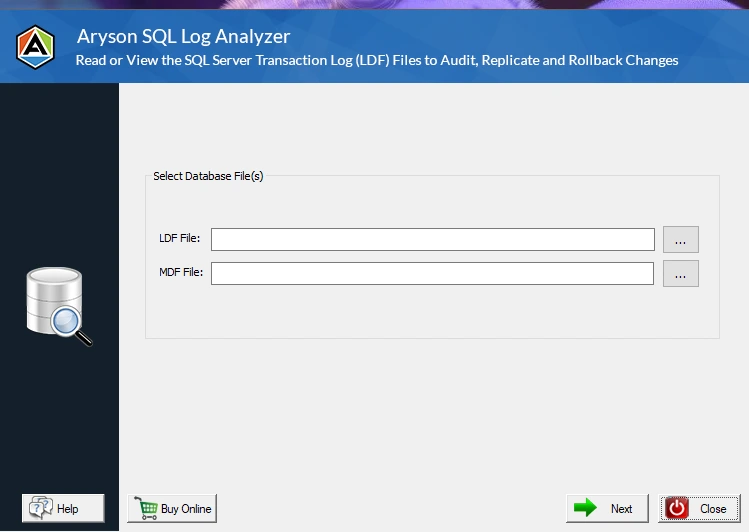
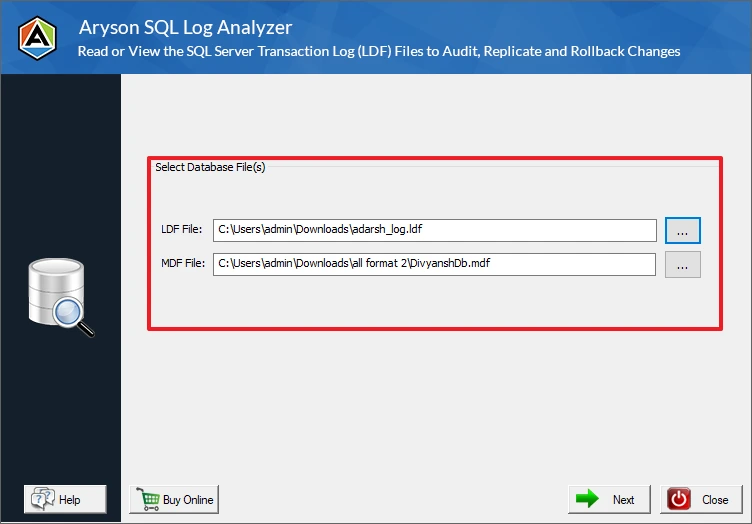
- After that, add the .ldf and .mdf files from your computer system.
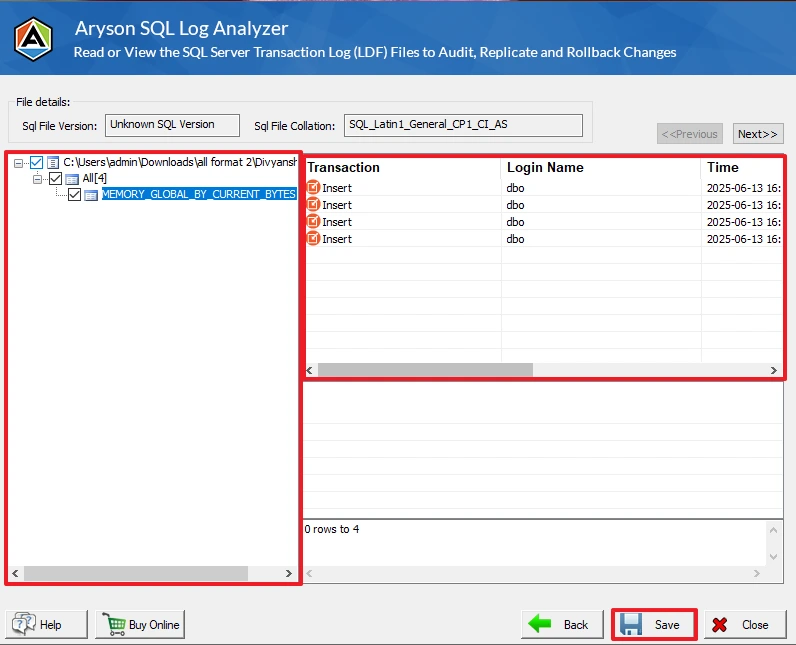
- Then, preview the file’s details display on your screen >> Save.
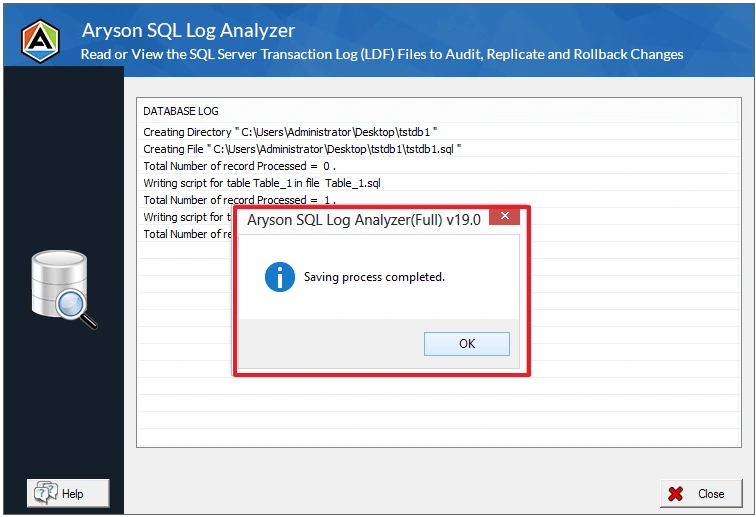
- At last, your files are saved successfully.
|
Why DBCC SHRINKFILE may not work? Generally, there are many common reasons due to which users face issues, that includes:
|
What prevents transaction log shrinking?
|
|
Can you delete the SQL Server Log File (.ldf)? No, you should not delete the .ldf file manually. However, doing this can cause a corrupt database and break database consistency. |
Why does the log grow Again After Shrinking? In reality, shrinking is not a permanent solution. The log grows again because of:
|
Advance Insights
|
1. Understand VLF Fragmentation SQL Server transaction logs are divided into Virtual Log Files (VLFs). Therefore, too many VLFs can slow down recovery, impact performance, and increase shrink time. |
|
2. Best Log File Size Strategy Instead of repeated shrinking, you can set the initial log size properly. Moreover, avoid frequent auto-growth and use a fixed growth size (e.g., 512 MB). |
|
3. When not to use DBCC SHRINKFILE You need to avoid shrinking if it is a part of regular maintenance, or you recently resized the log file. |
|
4. Automated Log Management Strategy You have to schedule regular log backups, monitor a log size, and alert on abnormal growth. This makes sure better database health and stability. |
|
5. Monitor Log Usage DBCC SQLPERF(LOGSPACE); |
|
6. Impact on Performance It causes disk input/output spikes, fragments files, and slows down future transactions. |
|
7. Real-World Scenarios If your log file suddenly grows to 100 GB, then take a log backup and fix the root cause. |
Best Practices to Manage SQL Server Log Files
- Must schedule regular log backups.
- Always monitor transaction log growth.
- You need to use a proper recovery model.
- Moreover, you have to monitor VLF fragmentation.
Conclusion
This article covers all the effective ways to reduce SQL Server log file size with DBCC SHRINKFILE, but it should be done carefully and not as a routine task. The key is to identify the root cause of log growth and implement a proper maintenance strategy. When you understand the VLF and log behaviour, then you can manage the transaction log efficiently without affecting performance. Therefore, it is recommended to follow the right approaches and clear SQL Server transaction log.
Frequently Asked Questions
1: How do I safely clear the SQL Server transaction log without deleting critical data?
Ans. First, take a transaction log backup, then use DBCC SHRINKFILE to remove inactive portions safely.
2: Can I delete the SQL Server log file (.ldf) to clear space?
Ans. No, deleting the .ldf file manually can corrupt your database and cause data loss.
3: Why won’t DBCC SHRINKFILE reduce my transaction log size?
Ans. Because active transactions or untruncated logs are still present in the file.
4: What prevents a SQL Server transaction log from shrinking?
Ans. Long-running transactions, replication, backups not taken, or active VLFs.
5: Why doesn’t shrinking the log file stop it from growing again?
Ans. Because SQL Server continues to record transactions, causing the log to grow again.
4.9 based on 1809 user reviewsAbout The Author:

Isha Singh is a content and website optimization expert who helps blogs and businesses grow organically. She specializes in enhancing content quality, improving site structure, and increasing online visibility through smart, practical, and easy-to-implement strategies that drive long-term results.
Related Post